TK.
-
Posts
15,261 -
Joined
Content Type
Profiles
Forums
Blogs
Gallery
Everything posted by TK.
-
Yes, it's even possible to modulate sequencer parameters via LFO E.g., during this experiment I controlled the amplitude of LFO Track #1 (sine waveform with 8 steps interval) with the LFO of Track #2 (saw waveform with 64 steps interval) Track #1 plays note events + an echo Fx, force to scale has been activated. That's called amplitude modulation :) Best Regards, Thorsten.
-
The BLM driver is completely implemented, but the inversion mask wasn't changed. I fixed this in beta3 Yes, to mute individual parameter layers. Thats especially useful if a track plays drum instruments - you can mute individual drums. This function is described under User Manual: Menu Pages Haha ;) no, this isn't possible - it would require a *huge* pattern memory to store the parameters for each step. Not only that the appr. SRAM space isn't available... it would also increase the time to change to a new pattern dramatically! However, once the Loopback function does also work for Sequencer Parameters (CCs), you will be able to change up to 16 Fx parameters per track for each individual step! I think that this will really cover your request. Beta3 is available now - from the ChangeLog: [tt] o if global loop mode enabled, a "*LOOPED*" message will flash at the right corner of the EDIT and STEPVIEW screen. o following handling has been added to realize a "smooth startup" for people who are in the progress of building their MBSEQ. The core is already running, they connect a SD Card but don't have LCDs (so that messages cannot be read): - if a SD Card without Banks/Songs/Mixer Maps is connected, the appr. files won't be created automatically anymore. - messages are print on the PATTERN/SONG and MIXER page to inform that files have to be created from the UTILITY->DISK menu - in the DISK->UTILITY menu you will find a special option at the left side which allows to start the formatting process (in fact, the SD Card won't be formatted, but some files will be created) - there is now a nice progress bar which informs about the state so long formatting is in progress o CLEAR button has to be pressed for 2 seconds before action is triggered o fixed BLM inversion mask configuration [/tt] Best Regards, Thorsten.
-
There is no reason why the length parameter shouldn't work. Could it be that the loop function was activated? (Fx->Loop) There shouldn't be a processing time issue. How can I reproduce this exactly? (describe the configuration steps) Didn't you request the possibility to mute parameter layers? Or who was it? ;) Yes, so long more than 4 parameter layers are configured. I guess you configured it for 8 or 16? If a track only consists of 4 parameter layers, ParLayer C button will toggle between layer C and D Doubleclicks won't really help - I could insert a delay (press button for more than 2 seconds) Best Regards, Thorsten.
-
Ok, thats a different scenario: the core is able to control all LEDs, correct? In this case the hardware is ok, and it's very likely, that you stored "all-LEDs-on" in the default snapshot. Turn off all LEDs, and press the snapshot button again (for ca. 3 seconds until the store function is triggered) Best Regards, Thorsten.
-

dual core midibox64 problems (repost)
TK. replied to axiomriddler's topic in Testing/Troubleshooting
The MIDIbox Link page describes a concept for linking multiple cores. Sharing the menu interface between multiple cores is described as a possibility, but it hasn't been implemented in any application available at my website. Accordingly this possibility isn't implemented in MIDIbox64, therefore you haven't made anything wrong. Best Regards, Thorsten. -
menu buttons for ain64_din128_dout128_v2... ?
TK. replied to mikee's topic in MIOS programming (Assembler)
This (extremely simple) application doesn't provide a menu interface. All events are preprogrammed in the C code and can only be changed there. They cannot be changed during runtime. Yes... as mentioned above: no menu interface Where did you found a reference which describes that ain64_din128_dout128 supports a menu? Best Regards, Thorsten. -
Protofuse: he uses the MIDIbox64 firmware... No, all LEDs should be off. Are the buttons working? If no: there seems to be a general problem with the SRIO chain, debugging help here: http://www.midibox.org/dokuwiki/doku.php?id=din_module If yes: there seems to be a connection problem between CORE:J8 and DOUTX4:J1 - the srio_interconnection test (as described on the DIN module page) helps to debug this as well. Best Regards, Thorsten.
-
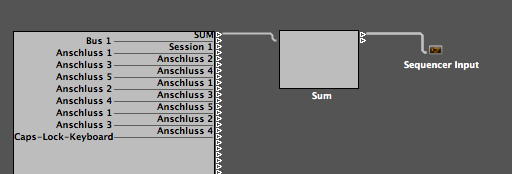
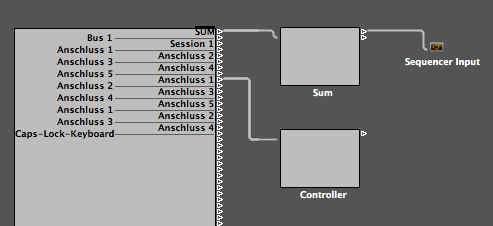
How does the MIDI Routing in your environment look like? If you route the SUM of all MIDI Inputs to the Sequencer Input (see first snapshot in attachment), the events sent by your MIDI Controller will be sent to the active track as well. This is probably something what you want to prevent. If you separate the MIDI controller by creating a special wire for the appr. input, the MIDI events won't be routed to the MIDI inputs (proposed solution, see second snapshot). Best Regards, Thorsten.
-
J5 provides Ground, 5V and 8 digital outputs. These digital outputs (0V/5V) are the gates. The clock is available at J6:RC, and the start/stop signal at J6:SC of the core module. No, it's only 0V/5V - you could amplify it to 10V with a transistor circuit. This is also a nice protection against overvoltages - very important for a modular system. Yes, the 24 ppqn MIDI Clock will be output as a 1 mS trigger signal. Best Regards, Thorsten.
-
MBSID will send the SysEx dumps (and program change events in addition) to slave SIDs whenever a Program Change has been received. If your Alphatrack responses with some unintended Note events this way, a possible solution could be to change the MIDI channel of MBCV, so that Notes on Channel #1 are ignored. The MIDI Channel configuration is part of the patch. It could also make sense to change DEFAULT_PATCH_CHANGE_CHANNEL in the setup_* File of MBCV, so that Program Change events sent from MBSID on Channel #1 are ignored as well. Best Regards, Thorsten.
-
Could it be, that this issue is just only related to your AlphaTrack controller? Why does it send MIDI messages to MBCV? Shouldn't Logic filter those events? Best Regards, Thorsten.
-
Read this page: http://www.ucapps.de/midibox_seq_manual_in.html Especially "Initial Setup for Wilba's Frontpanel" But the remaining informations could be helpful as well. Best Regards, Thorsten.
-
Are you able to create a .mid file which plays back the exact sequence that is causing this problem, so that I'm able to reproduce it at my side? (a Logic .lso File would work at my side as well) Best Regards, Thorsten.
-
Yes, MONO mode is fine for sequenced parts. You could also use LEGATO mode if you don't want a re-trigger on overlapped notes, but this won't solve your problem. For some reasons the MBCV doesn't receive the Note Off events for played Notes. Could it be that you are sending a Program Change to MBCV which changes the MIDI channel or keyboard splitzone configuration while some Notes are still played? This could lead to such an effect. You could filter Program Change events which are sent to MBCV in your Logic environment to check this. Btw.: this seems to be a problem which never happened before with your setup, right? This would just second the assumption, that it is related to a MBCV configuration change at the wrong moment. A possible workaround (in the firmware) could be to empty the note stacks on program changes. But first I would like to know, if this is really the reason... Best Regards, Thorsten.
-
This could happen if your MBCV is in Mono mode (so that a Note Off will re-trigger the gate), and when your host sequencer sends a Note On, but never the corresponding Note Off event. Since you probably don't know, which Note Off event is missing: could you please check, if the gates can be deactivated by sending Note Off events for all Notes? (with Logic, you could create a track, open the pianoroll view, insert 128 short notes for all keys, and play this track). This should also help to determine, which note actually has been played (but never released) unintentionally. Your observations will be helpful to find a solution (e.g. a workaround in MBCV firmware) - currently I've no idea what is going on with your sequencer. Best Regards, Thorsten.
-
It is neither required to use a timer, nor to program this in assembly code. Just use the SR_Service_Prepare() hook, which is called each mS before the shift registers are loaded. Inside this hook, use a counter (a global variable), whenever it reaches a certain value (e.g. 200 for a 200 mS delay), apply an inversion pattern on all DOUT bits which should flash. Step by step (in the hope that it's understandable): define a global variable somewhere in the header of your application: // 8bit variable (range: 0..255) unsigned char flash_ctr; [/code] And insert following code into the ServicePrepare hook: [code] void SR_Service_Prepare(void) __wparam { if( ++flash_ctr >= 200 ) { flash_ctr = 0; MIOS_DOUT_SRSet(0, MIOS_DOUT_SRGet(0) ^ 0x01); } } This will: - read the 8bit value of the first shift register (#0) - XOR the value with 0x01 (means: first DOUT pin will be toggled) - write back the value into the first shift register - this will be done each 200 mS Examples for XOR patterns: 0x01: will toggle 1st LED 0x02: will toggle 2nd LED 0x04: will toggle 3rd LED 0x08: will toggle 4th LED 0x10: will toggle 5th LED 0x20: will toggle 6th LED 0x40: will toggle 7th LED 0x80: will toggle 8th LED To toggle multiple LEDs, just OR the values, e.g.: (0x01 | 0x80): will toggle the 1st and 8th LED The brackets are important!!! Or if you got practice, just write this into a single value without OR operation: 0x55: will toggle 1st, 3rd, 5th and 7th LED Ok, now you want to make the flash pattern variable and control it from another MIDI device. Define another global variable: unsigned char flash_pattern; [/code] (initialize it with 0x00 in the Init() hook) Modify the SR_Service_Prepare() hook the following way: [code] void SR_Service_Prepare(void) __wparam { if( ++flash_ctr >= 200 ) { flash_ctr = 0; MIOS_DOUT_SRSet(0, MIOS_DOUT_SRGet(0) ^ flash_pattern); } } Thats all. Now you can set a specific bit of the 8bit pattern (e.g. from the MPROC_NotifyReceivedEvnt() hook when a certain MIDI event has been received) with: // it is assumed that dout_pin is in the range of 0..7 flash_pattern |= MIOS_HLP_GetBitORMask(dout_pin); [/code] and you can clear it with: [code] flash_pattern &= MIOS_HLP_GetBitANDMask(dout_pin); Next step: you want to flash more than 8 LEDs - it's time to use an array, e.g.: // prepared for all 128 DOUT pins unsigned char flash_pattern[16]; [/code] (initialize all array elements with 0x00 in the Init() hook) Modify the SR_Service_Prepare() hook the following way: [code] void SR_Service_Prepare(void) __wparam { unsigned char sr; if( ++flash_ctr >= 200 ) { flash_ctr = 0; for(sr=0; sr<16; ++sr) MIOS_DOUT_SRSet(sr, MIOS_DOUT_SRGet(sr) ^ flash_pattern[sr]); } } Setting/clearing a specific bit will require following code: // it is assumed that dout_pin is in the range of 0..127 flash_pattern[dout_pin >> 3) |= MIOS_HLP_GetBitORMask(dout_pin); [/code] and you can clear it with: [code] flash_pattern[dout_pin >> 3] &= MIOS_HLP_GetBitANDMask(dout_pin); Have fun by doing some more experiments! :) Best Regards, Thorsten.
-
A new version is available (RC33) (sorry, no alternative frequency table yet...) ChangeLog: o built for MIOS V1.9g (or higher) to support new encoder types. Rotary encoders won't work with older MIOS versions! Note that MIOS only has to be updated on the master SID, as encoders are not connected to SID slaves anyhow. o a new LED matrix visualisation mode for sammichSID has been added which is selected with DEFAULT_LEDMATRIX_MODE 2 - Lead and Bassline engine: 6x8 LEDs show VU meters for OSC frequency - Multi and Drum engine: 6x8 LEDs show animated VU meters for OSC triggers - ASID player mode: 6x8 LEDs show animated VU meters for OSC triggers o animated VU meters are a bit faster now o a special configuration file and prebuilt binary for sammichSID is now part of the release package -> setup_sammich_sid.hex [/code] Please update your MIOS installation before uploading this new version! Fortunately a MIOS V1.9g update is only required for the SID master core, since no rotary encoders are connected to the slaves. Best Regards, Thorsten.
-
Hi Whomper, in V3.4f banks can be selected via CC: http://www.midibox.org/forum/index.php/topic,12668.msg121884.html#msg121884 Best Regards, Thorsten.
-
V3.4f is finally available. From the ChangeLog: o built for MIOS V1.9g (or higher) to support new encoder types. Rotary encoders won't work with older MIOS versions! o Groove function now takes the global step has reference instead of the local step. This results into better results on a non-linear step progression. o Bank of group #1-#4 can now be selected via CC#116..CC#119 o due to various user requests, the previously introduced "set/clear all trigger" function has been disabled by default. It can be enabled again with the DEFAULT_BEH_ALL_WITH_TRIGGERS switch in setup_*.asm 0: only parameter layers are modified by ALL function 1: all trigger and parameter layers are modified by ALL function [/code] Please update your MIOS installation before uploading this new version! Best Regards, Thorsten.
-
A new MIOS8 release is available. Due to compatibility reasons an update is strongly recommented if you are planning to upload an application which uses rotary encoders, otherwise the encoders won't work correctly! Details: The encoder driver has been overworked based on proposals from Avogra (thank you!) Now it can even handle excotic encoder types without changes in MIOS code. MIOS_ENC_MODE_DETENTED4 and MIOS_ENC_MODE_DETENTED5 have been added. MIOS_ENC_MODE_DETENTED4 should be used for the so called "cheap Panasonic encoders" which are available at www.pollin.de The performance of the encoder driver has been improved as well. The new method required a change of the MIOS_ENC_MODE_NON_DETENTED and MIOS_ENC_MODE_DETENTED* definitions, which unfortunately makes all previously released applications incompatible. Accordingly, all applications have been re-released. The new binaries can be downloaded from the MIOS download page: http://www.ucapps.de/mios_download.html (if you don't see the new files, just press the refresh button of your webbrowser) In order to update MIOS, please upload the <derivative>/midi/mios_v1_9g_<derivative>.hex file of the mios_v1_9g.zip package first, thereafter the .hex file of the application. Informations for programmers: The only files which need to be updated are $MIOS_PATH/include/asm/mios.h and $MIOS_PATH/include/c/cmios.h These files are part of the new mios_base_v1_1 package. If you are working with the SVN repository, just start an automatic update (e.g. under Mac/Linux: go into the trunk directory and type "svn update ."), otherwise download the .zip file. The next MIOS8 update can be expected in ca. 2 years - as usual ;) Have fun! Best Regards, Thorsten.
-
Thats a good one. When I compare the generated _output/main.asm file with and without the cast, I don't see any difference in the assembly code. Are you sure that you haven't changed something else in addition? Best Regards, Thorsten.
-
A cast shouldn't be required... which SDCC version are you using? Best Regards, Thorsten.
-
Such informations are really relevant if you post this in a new thread! Why not using one of your older threads in the C section, so that everybody knows the history? This would result into more explicit help... However, the received events are neither defined in pot_event_map, nor button_event_map. Thats strange. It would be insteresting which events are sent when you are writing: void DIN_NotifyToggle(unsigned char pin, unsigned char pin_value) __wparam { // a button has been pressed, send Note at channel 1 MIOS_MIDI_TxBufferPut(0x90); // Note at channel 1 MIOS_MIDI_TxBufferPut(pin); // pin number corresponds to note number MIOS_MIDI_TxBufferPut(pin_value ? 0x00 : 0x7f); // buttons are high-active } [/code] Best Regards, Thorsten.
-
I would propose to test the shift register connections as described here: http://www.midibox.org/dokuwiki/doku.php?id=din_module Best Regards, Thorsten.
-
This time it took a bit longer due to vacation... Shipped today: strogon14 ezChris papapoulp JustPhil thedishmop Lumstar sneakthief freddy matoz lead bromide Will be shipped once I got the v1.2 boards: mattflo Xem m00dawg afx cinhcet (Waiting for money) roger (Waiting for money) Waiting for the money: diggi jbaldwinroberts Morten Best Regards, Thorsten.