TK.
-
Posts
15,261 -
Joined
Content Type
Profiles
Forums
Blogs
Gallery
Everything posted by TK.
-
Check the MIDI port routing in MIDI-Ox, it seems that you've configured a loopback there which can cause such random effects. Also the "internal MIDI routing" in MIOS Studio can be easily messed up - have you ever changed it? (it can be displayed with Options->Show Internal Routing, and restored with Options->Restore Default Internal Routing) Best Regards, Thorsten.
-
Some PIC programmers don't erase the ID field correctly. A workaround is explained at the MIDI Troubleshooting Page (requires to use the PIC programmer) Something is wrong with your toolchain setup, because a MIOS application should start at 0x3000 (at 0x0000 the bootloader is located). But don't worry, there is a overwrite protection for the bootloader. It's still there and you haven't destroyed it (I'm writing this before you are assuming that the PIC has to be reprogrammed - this won't help in your case) For further analysis it would be interesting if the loopback works for other MIDI events. E.g., you could send a MIDI Note event with the virtual keyboard of MIDI-Ox and check if it is received back. Best Regards, Thorsten.
-
Thank you for the nice comments! Here is the .mp3 of the song. It isn't 100% perfectly played, especially the drums could be better, but I think that by doing corrections it would loose the live feel: http://www.ucapps.de/mp3/midibox_seq/mbseqv4_demo2.mp3 Best Regards, Thorsten.
-
Link to video MIDIbox SEQ V4 has reached beta state, let's celebrate this with a new demo! 0:00: The electronic harp is played by Sculpture (part of Logic Audio) - a Physical Modelling Synth which I really like! 0:00: MBSEQV4 plays the 16-step sequence with a new "step progression" feature: on each 4 step interval, the step is triggered twice. In addition, a customized groove template is applied on the velocity to accent the notes based on the master measure. This results into a more complex sequence which varies on each beat, but still sounds nice and not too random! 0:01: to understand the "step progression" feature watch the GP LEDs - they are stopping each 4th step 0:11: an Echo Fx is added with 64T delay. Note value is increased by +3 and forced to scale 0:17: an additional VST synth is added which gets use of the new "step progression" feature as well 0:21: Echo Fx: temporary increased to 6 repeats with +3 Note Value and +150% delay on each echo - let's scrub the harp! 0:31: adding drums 0:41: adding more synth lines, again with "step progression" to vary the sequence 1:04: adding a chord sequence played by MIDIbox SID V2 (a typical arpeggio patch is used) 1:48: probably you haven't noticed it due to the bad video quality, but I switched to another pattern which plays the electronic harp at C-3 on each step - the groove template is still enabled (boring?) 2:05: now something completely different: a LFO is applied on the harp sequence with sine waveform and an interval of 4 steps. Force-to-Scale is enabled 2:07: the LFO also sends a CC to Sculpture to vary the timbre. 2:13: adding Echo Fx (1 repeat, 64ppqn delay, +150% tick) to this "modulated sequence" 2:19: changing LFO waveform to Triangle 2:31: changing LFO waveform to Sawtooth 2:36: changing Echo Fx to 6 repeats 2:46: slowly changing LFO the period to 16 steps (enjoy the change-over effects!) 2:52: slowly changing LFO reset to 16 steps (enjoy the change-over effects!) 3:00: changing LFO waveform to Sine, play drums again 3:14: changing LFO waveform to Triangle 3:21: changing CC offset of LFO 3:33: unmuting the other instr uments 3:56: switching back to original sequence (my favourite moment ;-) 4:16: muting/unmuting the toms... 4:30: slowly muting the tracks 4:40: thanks for listening! :-) Best Regards, Thorsten.
-

Do you use a mixer to mix your SID's in your MB-6582
TK. replied to Futureman's topic in MIDIbox SID
I'm using a dedicated t.mix 1202 mixer for my MBSID. I modified it, so that beside of the 4 stereo inputs, the remaining microphone inputs can be used as mono channels. Whenever I want to use one or more SIDs in Bassline/Drum/Multi mode, I just plug the audio cables into different input sockets. And I'm using the Aux outputs for routing SIDs to alternative (Fx) channels. Best Regards, Thorsten. -
It seems that your MIDI interface sends some additional MIDI bytes while the EEPROM is programmed. Since interrupts have to be disabled during this time, it could cause a MIDI buffer overrun. I never saw such a strange interface behaviour before, but it's the only explanation I have for such an error message. Possible workaround: you could split the .hex file into multiple pieces and download them separately. Each file contains an EEPROM block. I guess that these files would work fine for the latest MBSID release (this is quick copy&paste, I haven't tried this...) eeprom_1.hex :0200000400F00A :100000004C656164205061746368202020202020AA :10001000000000000000000000008000FF000080E1 :1000200000FF00008000FF00008000FF0000800053 :10003000FF00008000FF50008000FF00008000FFF4 :1000400000800080008000800080008000800080B0 :1000500000007F00100002000000100002000000FD :10006000000400F00008000040800200001F0500AE :10007000001400F00008000040800200001F05008E :10008000001400F00008000040800200001F05007E :10009000000400F00008000040800200001F05007E :1000A000001400F00008000040800200001F05005E :1000B000001400F00008000040800200001F05004E :1000C00001800000000180000000018000000001AC :1000D000800000000180000000018000000000009E :1000E00000C00030FF0000FF304020000080808012 :1000F00000400050FF0000FF501030000080808062 :00000001FF [/code] eeprom_2.hex [code] :0200000400F00A 10010000010003C000000000020003C00000000066 :10011000030003C000000000040003C00000000052 :10012000050003C000000000060003C0000000003E :10013000070003C000000000080003C0000000002A :10014000FF000F3F0300000000000000000000005F :10015000000000000000000000000000000000009F :10016000F00000000000000000000000CB00001FB5 :1001700080CB00203FA0CB00405FC0CB00607FE081 :10018000404040404040404040404040404040406F :10019000404040404040404040404040404040405F :1001A000404040404040404040404040404040404F :1001B000404040404040404040404040404040403F :1001C000404040404040404040404040404040402F :1001D000404040404040404040404040404040401F :1001E000404040404040404040404040404040400F :1001F00040404040404040404040404040404040FF :00000001FF eeprom_3.hex :0200000400F00A :1002000000000200027800000000006000000060B2 :1002100000007F400000000010007F400000000050 :1002200010007F400000000010007F400000000030 :1002300010007F400000000010007F400000000020 :100240000000000002780000000000600000006074 :1002500001007F400000000010007F40000000000F :1002600010007F400000000010007F4000000000F0 :1002700010007F400000000010007F4000000000E0 :100280000000000002780000000000600000006034 :1002900002007F400000000010007F4000000000CE :1002A00010007F400000000010007F4000000000B0 :1002B00010007F400000000010007F4000000000A0 :1002C00000000000027800000000006000000060F4 :1002D00003007F400000000010007F40000000008D :1002E00010007F400000000010007F400000000070 :1002F00010007F400000000010007F400000000060 :00000001FF [/code] eeprom_4.hex [code] :0200000400F00A :020300000100FA :00000001FF In MIOS Studio, please enable Smart mode again! Best Regards, Thorsten.
-
The schematic was already on the BankStick page as directly visible .gif file... However, I added a link to the .pdf and Wilba's explanation (slightly changed... Wilba: if you want to change the wording, just modify the file in the repository) Best Regards, Thorsten.
-
Upload Mios Error - Received SysEx message of less than 8 bytes
TK. replied to MONSTA's topic in MIDIbox Tools & MIOS Studio
Thats a great idea, thanks for your help to improve documentation! :) But as Ilmenator already wrote: it makes sense to use the Wiki. Advantage: everybody can help to keep the pages up-to-date whenever details are changing. E.g., if I should ever release a mios_v1_9g.hex file (no need yet as there are no known bugs), I will probably ommit the update_*.hex variants, as nobody uses the old bootloader anymore, accordingly there is no need to check if an update is required. Refering to a update_without_installed_mios.hex file would only lead to unnecessary confusion. Best Regards, Thorsten. -
Upload Mios Error - Received SysEx message of less than 8 bytes
TK. replied to MONSTA's topic in MIDIbox Tools & MIOS Studio
update_without_installed_mios.hex or mios_v1_9f_pic18f452.hex will work in your case. (I guess that the most recent bootloader version is already installed, therefore you could also upload MIOS directly) Best Regards, Thorsten. -
Hi, Great to see, that you already got so much working before you wrote your first posting! :) Could you please attach your modified .asm file to this article? This should give me a complete overview. It's in the Wiki: http://www.midibox.org/dokuwiki/doku.php?id=home:mbhp:module:din_dout_pin_list Best Regards, Thorsten.
-
Upload Mios Error - Received SysEx message of less than 8 bytes
TK. replied to MONSTA's topic in MIDIbox Tools & MIOS Studio
Ok, this seems to be a firmware bug (maybe a protocol violation), because from my experiences with various interfaces (and especially with the MBHP_CORE_STM32 module) the internal MacOS driver works pretty stable (IMHO the most robust implementation compared to Windows and Linux solutions I know) I added the interface to the blacklist. I hope that you've more luck with your NI Audio 8 Best Regards, Thorsten. -
It doesn't work correctly anyhow! I will add this interface to the blacklist, as SysEx transfers are not working properly, see http://www.midibox.org/forum/index.php/topic,13658.msg117436.html Somehow I've the impression that many low-cost MIDI interfaces contain the same chip with the same buggy firmware. Good that MBHP_CORE_STM32 comes with an integrated USB interface ;) Best Regards, Thorsten.
-
Upload Mios Error - Received SysEx message of less than 8 bytes
TK. replied to MONSTA's topic in MIDIbox Tools & MIOS Studio
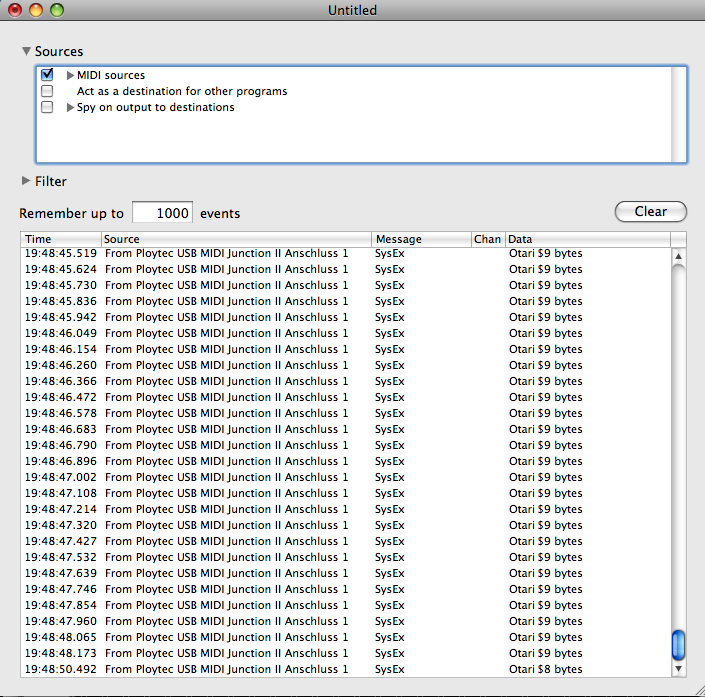
In order to exclude a MIOS Studio or Java installation issue: could you please doublecheck the incoming MIDI Messages with an alternative MIDI Monitor like this one: http://www.snoize.com/MIDIMonitor/ You should receive 9 byte SysEx messages like shown in the attached snapshot. Best Regards, Thorsten. -
is this hard to implement?...´bout shuffle n randomstep...´n stuff
TK. replied to nuke's topic in MIDIbox SEQ
Smash did some layout improvements to ensure perfect production results. I can give a "go" for "mass production" once I got the new prototype and tested it successfully. PCB + preassembled STM32F103RE + preprogrammed MIOS32 bootloader: ca. US $25! (unbeatable price :)) It makes sense to order the board+STM32 only to avoid customs. In Germany, the remaining parts can be purchased at Reichelt. Best Regards, Thorsten. -
The contrast pot should always have an effect, especially if V0 outputs 0V. So long the LCD hasn't been initialised, you will see a black bar at one line, especially if V0 (contrast voltage) outputs 0V. You should already see this line if only Vs, Vd and V0 is connected (again: V0 should output 0V, turn the contrast pot accordingly) Be careful when trying different connections - the LCD can easily be destroyed if Vs/Vd is connected to the wrong pins. Best Regards, Thorsten.
-
Upload Mios Error - Received SysEx message of less than 8 bytes
TK. replied to MONSTA's topic in MIDIbox Tools & MIOS Studio
Hi, which MIDI Interface are you using - is it listed here? Also the operating system could be for interest. Best Regards, Thorsten. -
is this hard to implement?...´bout shuffle n randomstep...´n stuff
TK. replied to nuke's topic in MIDIbox SEQ
I will get 5 new boards with presoldered STM32 from Smash soon. Two are already reserved for friends, two are for myself, so I could give you the remaining one if nothing unexpected happens (e.g. a friend notices problems with his board) (obsolete, but progress at Smash's side is very good, so that boards can be purchased from him directly!) No "burner" required, a COM interface with TTL level IO (which could also be USB based) is the most simple solution, see also: http://www.ucapps.de/mios32_bootstrap_experts.html However, Smash already programs the MIOS32 bootloader into the STM32, so that the application can be uploaded via USB MIDI. Best Regards, Thorsten. -
You are trying to compile an application from a release package, which only contains the files which were required for the release itself, and no variants. Solution: use the MIOS base package to get all files. Or better: since you are planning to integrate the application into the repository anyhow, download the repository, setup the environment variables (MIOS_PATH and MIOS_BIN_PATH), remove all directories of the release package which don't belong to the application itself, rename Makefile.org to Makefile and compile there. Best Regards, Thorsten.
-
is this hard to implement?...´bout shuffle n randomstep...´n stuff
TK. replied to nuke's topic in MIDIbox SEQ
I agree that it would be better to take the "reference step" as basis for the groove pattern, this only requires a small change in V3 and V4, so I will do this with the next V3 release. Especially for V4 this change will open new possibilities, e.g. in conjunction with the new progression parameters and customized groove templates (e.g. a groove only varies velocity, so that an additional CC track isn't required to generate effects like demonstrated in the MP3s) Note length: would it be ok if such a length entry is only available in the Length Layer, and not in other parameter layers? Such a feature can only be added to V4 of course! Best Regards, Thorsten. -
I'm not able to reproduce this, but looked into the code and found some fancy calculations to determine which encoder modifies the begin and end position of the range. It could make sense to add an additional check for the rightmost encoder as a workaround for unexpected states. Due to a holiday trip I'm not able to test the modifications - so, if you are able to build a .hex file, open src/cs_m_utils.inc, search for CS_M_UTILS_GP_Callback_Copy ;; change copy offset and copy marker to begin/end range depending on encoder which has been moved movf MIOS_PARAMETER1, W bz CS_M_UTILS_GP_Callback_CopyB [/code] and replace it by: [code] CS_M_UTILS_GP_Callback_Copy ;; change copy offset and copy marker to begin/end range depending on encoder which has been moved movf MIOS_PARAMETER1, W bz CS_M_UTILS_GP_Callback_CopyB xorlw 15 ; check for rightmost encoder (counted from zero): always modifies end position bz CS_M_UTILS_GP_Callback_CopyE movf MIOS_PARAMETER1, W ; back to original value If you are not able to build a .hex file by yourself, please wait for ca. 1 week. Best Regards, Thorsten.
-
Does this mean that you got a package from him meanwhile? What was the content (I see some additional PCBs on the sofa in background). According to his description you should get "2x 6562; 3x C1583 97G; 1x K30A-Y; 1x K30A-O; 1x C2291 82G; 1x BA6110" which are probably very expensive. Best Regards, Thorsten.
-
Works fine at my side (end of range can be changed with rightmost encoder if track length is 32) - so what is different at your side? Best Regards, Thorsten.
-
No, such a function isn't available since it would require the usage of a CC - providing a pattern switching functionality via CC is dangerous for the case that somebody connects another sequencer, or a MIDI controller/keyboard to the MIDI IN without knowning about the risks of data loss if a bank change CC (e.g. CC#0) is received. Therefore switching the pattern (not the bank) via CC instead of program change is only optional and disabled by default. I could add an option for bank switches as well, but I guess that sooner or later (e.g. once the first "accident" happened which destroyed the unsaved edit buffer), you will disable it again because of pure frustration. Personally I would never enable such a function by myself... therefore implementing a feature which nobody will use over long term anyhow is really low priority on my TODO list. Best Regards, Thorsten.
-
And here is the contemporary work (insider joke) ;) Following simple 4-step sequence is played: The tone colour is varied with a 16-step CC track: It sounds like this: mbseqv4_demo_progitv_len4n.mp3 Repetitive and boring. Ok, now we have some new magic "experimental progression parameters" in the Track Direction page, right side: Itv. (Interval): defines an interval of x steps after which: Repeat: the step will be repeated n times Skip: and/or m steps will be skipped In following example each 4 steps one step is skipped: mbseqv4_demo_progitv_len4s.mp3 And here each 4 steps the step will be played twice (repeat=1): mbseqv4_demo_progitv_len4r.mp3 Now let's try it with 16 notes: Again the result: repetitive and boring: mbseqv4_demo_progitv_len16n.mp3 Let's try Interval=4 and Skip=1: mbseqv4_demo_progitv_len16s.mp3 Or Interval=4 and Repeat=1: mbseqv4_demo_progitv_len16r.mp3 Or Interval=5 (uneven) and Repeat=3 (uneven as well): mbseqv4_demo_progitv_len16x.mp3 Fun! :) Selectable Interval: 1..64 steps Selectable Repeats: 0..16 steps Selectable Skips: 0..16 steps All parameters can be controlled from a loopback track for automated variations while the sequencer is playing. But tweaking the values manually and using a static setting already results into very interesting results. Best Regards, Thorsten.
-
fixed in RC31 Best Regards, Thorsten.