


TK.
-
Posts
15,261 -
Joined
Content Type
Profiles
Forums
Blogs
Gallery
Everything posted by TK.
-
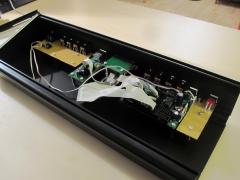
From the album: TK: MBSEQ Aluminium Case
-
Thank you! No objections anymore! :) Best Regards, Thorsten.
-
I think that I found the case where this can happen: if the new global configuration file /MBSEQ_GC.V4 doesn't exist (because you haven't changed a global parameter yet), the file handler wrongly assumes that something is missing in the session directory, and it "invalidates" the session, although it is valid. Invalid means, that neither patterns will be loaded, nor mixer map nor song will be updated. Temporary workaround: change any global parameter, such as the metronome port, and exit the menu page (resp. change to any other page) - this will create the /MBSEQ_GC.V4 file. The next version will handle this properly. Echopraxia's "sdcard" output confirms, that he has no MBSEQ_GC.V4 file on his SD Card yet, therefore I'm sure that this is the reason. Best Regards, Thorsten.
-
Did this happen after a firmware update? If yes: from which version did you update? Best Regards, Thorsten.
-
The transfer of 2 bytes takes 0.64 mS, you would hear a difference if for example the gate flags of the 3 waveform registers would be set one after another with such a delay. Try the "oscillator phase" parameter of the MBSID lead engine, then you known what I mean ;) Best Regards, Thorsten.
-
It looks better now - the remaining risk is at your side! ;) Just a last proposal: you could prepare a "dummy DIN5 socket" between the 4th MIDI OUT and the BLM socket. This would be helpful for the case that somebody doesn't want to connect a BLM, but wants to add a third MIDI IN/OUT provided by the MBHP_CORE_STM32 module. In this case he would need two DIN5 sockets. The MIDI OUT could be soldered at BLM location, the MIDI IN at the "dummy" location. You don't need to add connections to the "dummy" port - if somebody wants to use it, he could connect MIDI IN pins via two cables. Best Regards, Thorsten.
-
Fine that you found the HW error! To the "sdcard" command: I just noticed that it doesn't tell you, in which /SESSIONS/<session-name> the files are searched. Therefore the terminal output wasn't helpful, resp. it is confusing because your files in the root directory won't be read (exception MBSEQ_HW.V4 and MBSEQ_GC.V4) The session name (and complete path to the files) will be print with the next version. As long as this version is not available: the directory is also printed on the LCD when you press the MENU button (from where you are accessing the session) Let's say it's /SESSIONS/FOO Now look into the /SESSIONS/FOO directory of your SD Card from your PC - are there any MBSEQ_* files? Anyhow, if malfunctions were caused by the HW error (and this seems to be the case), please create a new session and check if the error happens again... Ignore all error messages which are caused by previous sessions! It could be possible to recover an old session by copying the appr. files into a valid session directory. Best Regards, Thorsten.
-
It's online now - it perfectly demonstrates the stereo capabilities :) (press refresh button of your browser if the MP3 isn't listed below the superpoly demo) Best Regards, Thorsten.
-
Pin 5 and 4 (MIDI OUT) are swapped Best Regards, Thorsten.
-
CC#98/99 selects the NRPN parameter, CC#26/6 sets the NRPN parameter. You mixed this - In your code a NRPN parameter is selected based on msb/lsb value - which has to be send with CC#26 and CC#6 In other words (for the case that the MIDI spec is too difficult to understand): MIDI supports up to 16384 NRPN parameters with a value range of 0..16383. It requires 4 CCs to select and set the parameter. Optimization measure #1: once a parameter has been set, you can change the value multiple times before another parameter is selected. Optimization measure #2: you can leave out the status byte for the second, third and fourth CC thanks to the "running status" feature. Detailed description: read MIDI spec again. But if your DAW isn't already able to interpret CC#98/99 correctly, it seems that it doesn't support NRPN at all. Did you already consider to contact the user support of the programs you are using? This should not only give you a definitive answer, but should also awake a certain awareness that users are asking for this (very simple to implement) feature! Best Regards, Thorsten.
-
Great progress - it seems that your version is becoming the best ASID player! :) Best Regards, Thorsten.
-
Thank you for publishing this great demo - I really like it! Do you allow me to add it to the MBSID main page? :) Best Regards, Thorsten.
-
Hi Robin, see this article: Best Regards, Thorsten.
-
If you want more room for additional button rows, we could ask Heidenreich for a second case design, e.g. for 4U or 5U panels. Best Regards, Thorsten.
-
Last update: I'm now using my own button elements, and the performance is much better. But it still doesn't run smooth on the iPad; it runs perfectly on the simulator (immediate update of the display). Since iPad and the Simulator (running on a MBP) communicate with MBSEQ via WiFi, I know that this is neither a MBSEQ issue, nor a protocol issue - it's either related to several Juce layers, or to the slow iPad CPU, or to the slow network interface of the iPad. For comparison: pinging an iPad from a MBP (MBP->WiFi->Router->WiFi->iPad): Macintosh:Desktop TK$ ping 192.168.1.110 PING 192.168.1.110 (192.168.1.110): 56 data bytes 64 bytes from 192.168.1.110: icmp_seq=0 ttl=64 time=26.624 ms 64 bytes from 192.168.1.110: icmp_seq=1 ttl=64 time=48.519 ms 64 bytes from 192.168.1.110: icmp_seq=2 ttl=64 time=72.720 ms 64 bytes from 192.168.1.110: icmp_seq=3 ttl=64 time=100.601 ms 64 bytes from 192.168.1.110: icmp_seq=4 ttl=64 time=143.209 ms 64 bytes from 192.168.1.110: icmp_seq=5 ttl=64 time=42.671 ms 64 bytes from 192.168.1.110: icmp_seq=6 ttl=64 time=84.293 ms 64 bytes from 192.168.1.110: icmp_seq=7 ttl=64 time=92.300 ms 64 bytes from 192.168.1.110: icmp_seq=8 ttl=64 time=112.074 ms 64 bytes from 192.168.1.110: icmp_seq=9 ttl=64 time=38.549 ms 64 bytes from 192.168.1.110: icmp_seq=10 ttl=64 time=63.361 ms 64 bytes from 192.168.1.110: icmp_seq=11 ttl=64 time=81.214 ms 64 bytes from 192.168.1.110: icmp_seq=12 ttl=64 time=105.147 ms ^C --- 192.168.1.110 ping statistics --- 13 packets transmitted, 13 packets received, 0.0% packet loss round-trip min/avg/max/stddev = 26.624/77.791/143.209/32.190 ms [/code] pinging MBSEQ from a MBP (MBP->WiFi->Router->MBSEQ): [code] Macintosh:Desktop TK$ ping 192.168.1.112 PING 192.168.1.112 (192.168.1.112): 56 data bytes 64 bytes from 192.168.1.112: icmp_seq=0 ttl=64 time=6.479 ms 64 bytes from 192.168.1.112: icmp_seq=1 ttl=64 time=4.614 ms 64 bytes from 192.168.1.112: icmp_seq=2 ttl=64 time=4.037 ms 64 bytes from 192.168.1.112: icmp_seq=3 ttl=64 time=4.359 ms 64 bytes from 192.168.1.112: icmp_seq=4 ttl=64 time=4.237 ms 64 bytes from 192.168.1.112: icmp_seq=5 ttl=64 time=3.504 ms 64 bytes from 192.168.1.112: icmp_seq=6 ttl=64 time=3.329 ms 64 bytes from 192.168.1.112: icmp_seq=7 ttl=64 time=4.056 ms 64 bytes from 192.168.1.112: icmp_seq=8 ttl=64 time=6.043 ms 64 bytes from 192.168.1.112: icmp_seq=9 ttl=64 time=5.708 ms 64 bytes from 192.168.1.112: icmp_seq=10 ttl=64 time=3.650 ms 64 bytes from 192.168.1.112: icmp_seq=11 ttl=64 time=3.435 ms 64 bytes from 192.168.1.112: icmp_seq=12 ttl=64 time=4.524 ms 64 bytes from 192.168.1.112: icmp_seq=13 ttl=64 time=4.664 ms 64 bytes from 192.168.1.112: icmp_seq=14 ttl=64 time=5.734 ms 64 bytes from 192.168.1.112: icmp_seq=15 ttl=64 time=2.350 ms ^C --- 192.168.1.112 ping statistics --- 16 packets transmitted, 16 packets received, 0.0% packet loss round-trip min/avg/max/stddev = 2.350/4.420/6.479/1.077 ms pinging MBSEQ which is directly connected to the ethernet port of a MBP (MBP->MBSEQ): Macintosh:Desktop TK$ ping 192.168.2.6 PING 192.168.2.6 (192.168.2.6): 56 data bytes 64 bytes from 192.168.2.6: icmp_seq=0 ttl=64 time=1.669 ms 64 bytes from 192.168.2.6: icmp_seq=1 ttl=64 time=1.506 ms 64 bytes from 192.168.2.6: icmp_seq=2 ttl=64 time=1.430 ms 64 bytes from 192.168.2.6: icmp_seq=3 ttl=64 time=1.177 ms 64 bytes from 192.168.2.6: icmp_seq=4 ttl=64 time=1.015 ms 64 bytes from 192.168.2.6: icmp_seq=5 ttl=64 time=1.010 ms 64 bytes from 192.168.2.6: icmp_seq=6 ttl=64 time=0.880 ms 64 bytes from 192.168.2.6: icmp_seq=7 ttl=64 time=0.706 ms 64 bytes from 192.168.2.6: icmp_seq=8 ttl=64 time=1.573 ms 64 bytes from 192.168.2.6: icmp_seq=9 ttl=64 time=1.396 ms 64 bytes from 192.168.2.6: icmp_seq=10 ttl=64 time=1.280 ms 64 bytes from 192.168.2.6: icmp_seq=11 ttl=64 time=1.181 ms 64 bytes from 192.168.2.6: icmp_seq=12 ttl=64 time=1.036 ms 64 bytes from 192.168.2.6: icmp_seq=13 ttl=64 time=0.914 ms 64 bytes from 192.168.2.6: icmp_seq=14 ttl=64 time=0.764 ms 64 bytes from 192.168.2.6: icmp_seq=15 ttl=64 time=1.634 ms 64 bytes from 192.168.2.6: icmp_seq=16 ttl=64 time=1.496 ms 64 bytes from 192.168.2.6: icmp_seq=17 ttl=64 time=1.286 ms ^C --- 192.168.2.6 ping statistics --- 18 packets transmitted, 18 packets received, 0.0% packet loss round-trip min/avg/max/stddev = 0.706/1.220/1.669/0.293 ms [/code] Best Regards, Thorsten.
-
Update: communication via OSC is working, but graphic output is too slow. :-/ Time to optimize the "LED" handling. Best Regards, Thorsten.
-
Good news: the Juce based virtual BLM can be compiled for iOS It's properly running on my iPad - next step is to add the OSC code :) Imperfection: Juce isn't able (yet) to rotate the screen - seems that this has to be hardcoded. Best Regards, Thorsten.
-
IMHO connecting MIDI via a wire doesn't make on an iPad - computers have been invented for such a usecase, but not the iPad ;) You won't find so many informations about using OSC for MIDI, thats something that I've developed. I'm using the same library for MIOS32, Juce (-> MacOS, Windows, Linux), native MacOs and iPad - the code is optimized for embedded systems (and therefore runs much faster than common OSC libraries) and code written for this library is compatible with any of these operating systems. :) The problem is, that a complete new user interface has to be developed which is optimized for touch screen entry, because the "emulated frontpanel" isn't really ergonomic. I've no clear ideas about the UI part yet - it will need some months to work out such a plan, and here the process could be speed up if somebody experienced in creating user interfaces could help. Best Regards, Thorsten.
-
I guess that you are using Wilba's frontpanel? If SR6 toggles, it means that the last DIN SR has no pull-up at pin #10 (SER) Check that all resistor (arrays) are mounted and properly soldered! SD Card: please type "sdcard" into the MIOS terminal and copy&paste the output into this article. Note that by right-clicking on the terminal window you can copy the content (no need to make snapshots) MBSEQ supports FAT8, FAT16 and FAT32 And another hint: type "help" to get a list of some other helpful commands. Best Regards, Thorsten.
-
I've a similar project, but it's a little bit more advanced, because it supports: USB MIDI UART MIDI (up to 3 IN ports and 3 OUT ports) OSC (requires MBHP_ETH module) CV (requires MBHP_AOUT* module) Thats already possible by using OSC My plan is to provide such an app, but there are other higher-prio things in the queue... ;) We could speed up this if somebody would help me with the graphics! Btw.: OSC seems to be popular as well, e.g. Pianist Pro supports this: http://midibox.org/forums/index.php?app=gallery&module=images§ion=viewimage&img=474 I'm able to directly control my MBSEQ with this app (w/o using a PC), and it's also possible to route key/pitch/CCs via the OSC port of MBSEQ to a physical MIDI IN/OUT by using MBSEQ Since this is working w/o problems, and since I'm already able to send/receive OSC messages on an iPad with my own applications, this is probably the route to go. Best Regards, Thorsten.
-
There isn't enough free memory in the PIC18F452 to add the code for the SID player. This was one of the reasons why I started with V2 on a new PIC Here the update instructions: http://www.ucapps.de/midibox_sid_manual_up.html Best Regards, Thorsten.
-
no problem for me, as Nils handles the orders ;) Best Regards, Thorsten.
-
First of all: you should update to beta27 to prevent this nasty crash issue! Thereafter: add the USB socket, because error messages are only sent USB1 (messages would affect the MIDI timings too much if they are sent over a common MIDI interface). Error 11 means that DOSFS wasn't able to create a new file. So this really seems to be an issue with your SD Card (either physically, or format related) The message sent over USB1 could give more diagnosis informations. Best Regards, Thorsten.
-
Hi, did you already consider to contact Akai support for a replacement? I had a similar issue on my Yamaha AN1x ribbon sensor some time ago - I called the local Yamaha service center in Germany and they sent me a replacement for only 10 EUR (including shipping!) :) Best Regards, Thorsten.
-
The blm_x driver can handle RGB LEDs: http://svnmios.midibox.org/listing.php?repname=svn.mios32&path=%2Ftrunk%2Fmodules%2Fblm_x%2F You could ask "this" for integration assistance. a DOGXL driver already exists under http://svnmios.midibox.org/listing.php?repname=svn.mios32&path=%2Ftrunk%2Fmodules%2Fapp_lcd%2Fuc1610%2F It has been created by Phil Taylor, and was also tested by Wilba However, with the 4x6 small_font only 40x13 characters could be displayed. You would need two displays (the driver supports this) Best Regards, Thorsten.
