


TK.
-
Posts
15,261 -
Joined
Content Type
Profiles
Forums
Blogs
Gallery
Everything posted by TK.
-
An extravagant demo! ;) Do you notice the same timing accuracy issues on a fast computer as well? My approach was to add a hook into the resid emulation, so that the emulated SID + the real SID can be played in parallel. This was the easiest way to compare the timings, but also the differences between original and emulation. Best Regards, Thorsten.
-
During a relaxing session with my BLM I noticed a crash scenario which was caused by a gcc compiler bug. This crash exists since beta26 (caused by several infrastructure updates), but it cannot be excluded that it already caused nasty random things in the past. Therefore an update is strongly recommended! ChangeLog beta27: o fixed a crash on rescheduled notes (caused by a gcc bug) o BLM keyboard mode: now inverted (lowest button row plays highest velocity) o BLM keyboard mode takes octave/semitones transpose values into account o copy/paste function: if Paste/Clr track is activated in options menu, channel and port setting will be copied as well. This allows to copy&paste a complete track from one pattern to another. o Paste/Clr steps/track setting in options menu is now a global setting and will be written into MBSEQ_GC.V4 instead of (the session specific) MBSEQ_C.V4 file. In future versions it might be a good idea to move global settings into a separate menu page. [/code] Best Regards, Thorsten.
-
Echopraxia: please try the new release, it displays messages in the MIOS terminal on SD Card errors. Beta26 is available now - from the ChangeLog: o SD Card error messages will be sent to MIOS terminal o added MIOS terminal commands "play" and "stop", so that the sequencer can also be started/stopped from MIOS Studio o the status LED of the core module flashes on each beat now o bugfix for FAST button o OSC support for "Pianist Pro" format (an iPhone/iPad application) Now you can send notes and pitch changes from Pianist Pro to your MBSEQ, and convert them into MIDI events o support for a third MIDI IN/OUT port. The digital MIDI OUT signal (open drain!) is available at J5B.A6 The digital MIDI IN signal is available at J5B.A7 Note that the MIDI IO circuit (220 Ohm Resistors, optocoupler, etc.) is not part of the MBHP_CORE_STM32 module and has to be added externally. This IO port can especially be used for a dedicated BLM connection (this will be my personal usecase) o Gate #7 and #8, which were previously available at J5B.A6 and J5B.A7, are now available at J5C.A10 and J5C.A11 [/code] References: new interconnection diagram which shows the "CV extension connector": http://www.ucapps.de/midibox_seq/mbseq_v4_interconnections.pdf schematic for MIDI IN3/MIDI OUT3 extension: http://www.ucapps.de/mbhp/mbhp_core_stm32_midi3_extension.pdf schematic for BLM connector: http://www.ucapps.de/midibox_blm/blm_connector_mbseq.pdf Best Regards, Thorsten.
-
Hi, I'm not sure if COM drivers are working properly with newer windows versions anymore. With WinXP users reported already issues... of course! :) MBSEQ V4 provides 4 MIDI USB ports, and they are working with best performance (much faster than common MIDI connections) Best Regards, Thorsten.
-
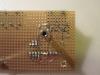
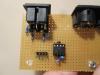
Attached you will find the pictures of a "certified circuit" ;) Ignore that I'm only using a 4-pin header, and ignore that +/- are swapped compared to the MBHP_CORE::J11 port Best Regards, Thorsten.
-
I'm just soldering my prototype BLM socket and noticed two things: some pins are swapped in your layout, and the footprint doesn't match with the socket available at Reichelt. More input soon. Best Regards, Thorsten.
-
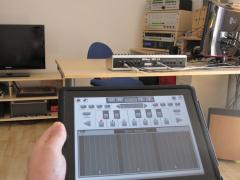
From the album: TK: MBSEQ Aluminium Case
Remote controlling my MIDI gear with Pianist Pro (running on an iPad) via MBSEQ. The OSC port of MBSEQ is connected to a WiFi router. -
From the documentation: The knob layer gives you access to 5 customizable parameters, which can be assigned to two different sound parameters, and which are also available as modulation sources. A Min/Max range can be specified for each knob individually. Assignments and ranges are stored within the patch structure - so, each patch can have its own set. This feature is intended for ergnomic usage during live playing, but also for easy MIDI automation (activate the CC function to send knob movements, so that they can be recorded with a sequencing software). Best Regards, Thorsten.
-
Finally I got a fitting backpanel from Schaeffer! :) No issues anymore - here is the .fpd file: http://www.ucapps.de/midibox_seq/tk_mbseq_backpanel_v1_1.zip Best Regards, Thorsten.
-
you are right, I mixed this with a question from another guy who wanted to multiplex more than 64 pots - in such a case the AIN multiplexers have to be controlled from remaining free pins, and if no AOUT or SID module is used, J19 would be a suitable candidate. But in your case it's ok to connect the multiplexer control lines to J15C as configured in this example: http://svnmios.midibox.org/filedetails.php?repname=svn.mios32&path=%2Ftrunk%2Fapps%2Ftutorials%2F012_ain_muxed%2Fmios32_config.h Yes, because the BLM_SCALAR has a DIN and DOUT chain as well. Just connect the DIN module to the end of the BLM DIN chain (J2, the upper pin row with RC/SC/SI/Vd/Vs) Best Regards, Thorsten.
-
I will have to migrate it first, this will probably take one evening (together with testing it with the original hardware), therefore please don't expect an immediate solution. However, there is no real blocking point, it will work on the Core32 If you want to get some more impressions about MIOS32 and C programming, work through the tutorial: http://www.ucapps.de/mios32_c.html The README.txt files are very verbose! I will also give you access to the hidden programmers lounge where you will find more informations, e.g. about toolchain installation etc (stuff which isn't documented on my website yet...) There are some errors, e.g. instead of J5-DOUT write J8-DOUT The AIN multiplexers have to be connected to J19 A BLM_SCALAR module cannot scan encoders, you will need dedicated DIN registers for this. When you compare the pin assignments (resp. signal names) between J8/9 of the MBHP_CORE and MBHP_CORE_STM32 module you will notice that they are identical. There are no special/new DIN/DOUT modules for Core32 - if people want to connect separate DIN/DOUT chains, they will have to split the cable, or they have to use SmashTV's special DIN/DOUT module variants, which are available since years. Best Regards, Thorsten.
-
No problem - you can leave out buttons and/or LEDs, there are no dependencies. :) Best Regards, Thorsten.
-
I'm interested in such an option as well since months, but haven't found an easy to handle solution yet, resp. a solution which fits with the available memory resources (that are very limited). This seems to be the best one so far: global knob assignments are hardcoded and defined in setup_*.asm files for people who really want to customize them (but I guess that most people will be happy with the default assignments) we need different assignments for lead/bassline/drum/multi engine global assignments are selected whenever the local (patch) parameter assignment is set to 0 - this means that they will be active for all existing patches (since this is the default setup anyhow) Now I only need some proposals for useful default assignments for Knob 1 (Modwheel) and Knob 2-5 --- anyone? Best Regards, Thorsten.
-
Something seems to be wrong with your MIDI interface - an error scenario which isn't detected by MIOS Studio. E.g., the high upload time of more than 800 seconds for MIOS (usually it takes ca. 10 seconds) indicates, that a lot of errors have already been reported by MIOS during the upload procedure (you should see some SysEx based error acknowledge responses in the MIDI IN monitor), but you haven't mentioned them... Do you own another MIDI interface that you could try? Best Regards, Thorsten.
-
Hi Rics, short question before continuing the discussion about the best approach: do you have programming skills? for 152 LEDs and 166 push buttons you could just re-use the BLM_SCALAR firmware (see http://svnmios.midibox.org/listing.php?repname=svn.mios&path=%2Ftrunk%2Fapps%2Fcontrollers%2Fblm_scalar%2F) see also this special forum section for further informations: http://midibox.org/forums/forum/43-midibox-blm/ adding software handlers for encoders and pots isn't a big task, this would just be a 1:1 integration of existing programming examples: http://www.ucapps.de/mios8_c.html using the LEDs in matrix configuration has another big advantage: it decreases the power consumption dramatically! if you would drive LEDs with dedicated DOUT outputs, the MIDIbox will probably consume more than 1A and therefore cannot be powered via USB. at the end only a single core8 module will be required. another hint: if you have semi programming skills, I could also give you a similar BLM_SCALAR firmware for the MBHP_CORE_STM32 module - you only would have to adapt it for your own needs. eagle schematics to the .brd files at ucapps.de don't exist, as i enter the netlist directly into the layout editor (thats really a FAQ) best regards, thorsten.
-
hallo, robin fawell moechte etwas sehr aehnliches realisieren. am besten liest du dir mal folgende threads durch (doch vorsicht: bis zum ende, da sich konzeptionell immer wieder etwas geaendert hat - es wurde auch noch nicht implementiert). da bei ihm die tasten zu einer matrix geschaltet sind, lassen sie sich mit wenigen DOUT/DIN SRs scannen, dies waere auch bei deinem projekt eine elegante loesung. anzahl der DIN/DOUT: somit definitionssache anzahl der AIN: bis zu 96 gruss, thorsten.
-
without knowing the SD card error number (which will be displayed on LCD on failures) it's impossible for me to determine what happened. my proposal: as it seems that other users are not affected by such issues, try another SD card just to check if this is the reason. you can copy the files from one card to another with your PC. it would be interesting, if your PC can access all files... in the next MBSEQ release i will add an optional logging-mechanism for SD card errors (e.g. they could be sent to the MIOS32 terminal) to simplify debugging. a "cleared" message won't be displayed, but the actual operation (all steps cleared) will be performed. can you confirm this? is it really an issue that no confirmation message will be displayed? i think that too many messages will slow down operations too much. best regards, thorsten.
-
Hi, you have to consider that patch changes consume more than 1 mS (unfortunately, thats the disadvantage of the low-cost PIC) If too many patch changes are sent at the same moment, a MIDI buffer overrun can happen, accordingly some patch changes can get lost. Solution: add a delay between the patch changes. Alternative solution: if you need to change sounds very often, consider to use Multi Engine based patches instead, and assign the sounds to different channels and/or keyboard zones. This allows to realize typical C64-like tunes with many different sounds. Best Regards, Thorsten.
-
Hi, short answer: you are trying to upload a v1 library, this won't work, because the SysEx format has changed. Just upload the v2_vintage_bank.syx file which can be found in the preset/ directory of the midibox_sid_v2_*.zip release package. long answer (for the records): no, the firmware is clever enough to detect firmware dumps even during runtime! :) If you really need this: just send a ping as documented in the doc/mbsidv2_sysex_implementation.txt file of the release package please add the soundcard to the list if upload is still not working, but as mentioned above you are trying to upload the wrong files anyhow. if MIOS Studio detects a valid bidirectional connection, then MBSID should return an acknowledge message whenever a valid SysEx block has been received. but you are trying to upload SysEx blocks for another device - they are ignored (to match with the MIDI spec) please try the official vintage library first. there might be other libraries for v2 anywhere in the internet (or the forum) of course! the idea behind a device ID is *to be relevant* on SysEx uploads ;) Best Regards, Thorsten.
-
alright! :) somehow this makes sense to me: the power consumption depends on how many LEDs are active at once. Normally a single LED consumes up to 20 mA, but the current draw is already limited to ca. 10 mA via the 74HC595 and 220 ohm resistor. let's say you've connected 64 LEDs, makes up to 640 mA! So, your previous PSU was definitely not strong enough. during power-on it can happen that all LEDs are active for a short moment (ca. 100 mS, you won't notice this), as long as the 74HC595s are not initialized. putting a finger on a floating line (SC is floating during these 100 mS) will probably avoid that the LEDs are active during this startup phase, maybe because you are grounding a SC by doing so. however, good that you found the reason! best regards, thorsten.
-
thanks for the compliments! :) you can customize the menu pages in cs_menu_tables.inc http://svnmios.midibox.org/filedetails.php?repname=svn.mios&path=%2Ftrunk%2Fapps%2Fsynthesizers%2Fmidibox_sid_v2%2Fsrc%2Fcs_menu_tables.inc the format should be easy to understand, especially if you only want to shift/swap some entries. thereafter just rebuild the firmware and upload the new .hex file best regards, thorsten.
-
it should tell you "all 4 patterns stored" for ca. 2 seconds at the right lcd. are you sure that the button is working? yes - you have to press&hold the button for two seconds, a message will be displayed which asks you to do this. so far i remember this special handling was requested by you? best regards, thorsten.
-

new direction for midibox live (ableton live integration)
TK. replied to ultra's topic in MIDIbox User Projects
i'm not a live user, but i like the modular design idea, and the decision to create different firmwares for different purposes, because this avoids the difficult "resource management" (e.g. pin assignments, allowed external peripheral combinations, etc.). a "light wighted" firmware will also make it easier for other people to create derivatives, e.g. special adaptions for other DAWs :thumbsup: Best Regards, Thorsten. -
you got mail... i'm using 20 and 10mm spacers, no 'double female' the screws are at the bottom side, i guess that there are better solutions? if a spacer was not long enough, i added a screw nut to extend it - this was the cheapest solution for me, no special reichelt order required. best regards, thorsten.
-
it cannot work properly this way, dedicated button handling functions have to be created. this would also allow to consider the shift button. if the examples under seq_buttons.inc don't help, you have to wait until i'm back from vagation. best regards, thorsten.

