
ABP Electronics
-
Posts
32 -
Joined
-
Last visited
ABP Electronics's Achievements

MIDIbox Newbie (1/4)
0
Reputation
-
Hello, I hope someone can help me. I am trying to have 3 different layers of sound generated with 1 physical keyboard. I.e play piano with strings :) I have 2 physical keybeds Keyboard= 1 and Keyboard= 2 Each of them is assigned to 3 different channels on different output ports. When I play one key I have desired result only on first press. I.e press note C and it plays on 3 different channels. On second press I have three notes generated but all on the same channel. Here is my config file: # KEYBOARD hardware KEYBOARD n=1 rows=16 dout_sr1=1 dout_sr2=2 din_sr1=1 din_sr2=0 din_inverted=0 break_inverted=0 din_key_offset=32 \ make_debounced=1 break_is_make=0 \ scan_velocity=1 scan_optimized=0 note_offset=36 \ delay_fastest=5 delay_fastest_black_keys=0 delay_slowest=100 EVENT_KB id= 11 hw_id= 1 type=NoteOn chn=1 key=any use_key_number=1 range=0:127 ports=00010000000000000000 EVENT_KB id= 15 hw_id= 1 type=NoteOn chn=4 key=any use_key_number=1 range=0:127 ports=10000000000000000000 EVENT_KB id= 16 hw_id= 1 type=NoteOn chn=5 key=any use_key_number=1 range=0:127 ports=10000000000000000000 KEYBOARD n=2 rows=16 dout_sr1=3 dout_sr2=4 din_sr1=3 din_sr2=0 din_inverted=0 break_inverted=0 din_key_offset=32 \ make_debounced=1 break_is_make=0 \ scan_velocity=1 scan_optimized=0 note_offset=48 \ delay_fastest=5 delay_fastest_black_keys=0 delay_slowest=100 EVENT_KB id = 12 hw_id= 2 type=NoteOn chn= 1 key=any use_key_number=1 range=0:127 ports=10000000000000000000 EVENT_KB id = 13 hw_id= 2 type=NoteOn chn= 2 key=any use_key_number=1 range=0:127 ports=10000000000000000000 EVENT_KB id = 14 hw_id= 2 type=NoteOn chn= 3 key=any use_key_number=1 range=0:127 ports=10000000000000000000 Here is what I see on Mios Studio. First press after resetting: [179820.721] 90 48 01 Chn# 1 Note On C-4 Vel:1 [179820.721] 91 48 01 Chn# 2 Note On C-4 Vel:1 [179820.722] 92 48 01 Chn# 3 Note On C-4 Vel:1 [179820.927] 92 48 00 Chn# 3 Note Off C-4 (optimized) [179820.927] 92 48 00 Chn# 3 Note Off C-4 (optimized) [179820.928] 92 48 00 Chn# 3 Note Off C-4 (optimized) As you can see NoteOn seems to be OK, but then we see all three notes on channel 3 Then let's play the same note again: [179974.952] 92 48 1d Chn# 3 Note On C-4 Vel:29 [179974.952] 92 48 1d Chn# 3 Note On C-4 Vel:29 [179974.952] 92 48 1d Chn# 3 Note On C-4 Vel:29 [179975.626] 92 48 00 Chn# 3 Note Off C-4 (optimized) [179975.626] 92 48 00 Chn# 3 Note Off C-4 (optimized) [179975.628] 92 48 00 Chn# 3 Note Off C-4 (optimized) Plays all three notes on the same channel, same for notes OFF. Anyone can help me understanding what is wrong?? Regards, Bartosz
-
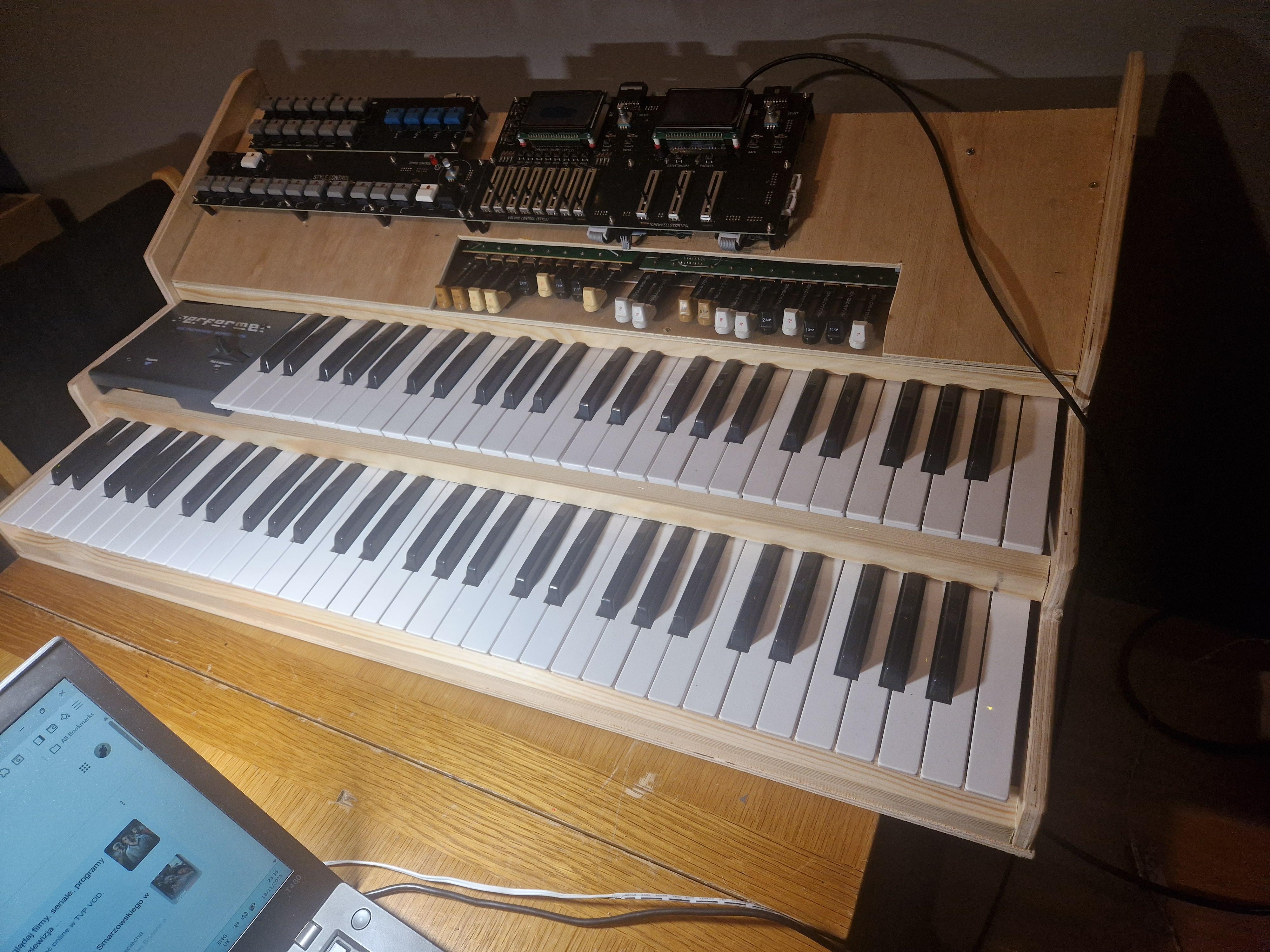
Hi everyone, After nearly a decade of silence, we are resuming our project. What once was merely a concept is gradually taking shape as a tangible endeavor, culminating in my son's high school graduation. I shall endeavor to share updates and photographs of the project in the coming weeks. The initiative is based on the Midibox NG platform, complemented by additional software written in Python that operates on the host side. I wonder whether anyone is still engaged with Midibox NG, as the last official version was released in 2018, and the most recent version available on GitHub dates back to 2020. I ask because I will likely have numerous questions, and I wish to share insights and ideas. I regard Midibox NG as an exceptional concept; it would be a shame if it were left unfinished. Best regards, Bartosz
-
Hello Midiboxers !!! After 9 years of hibernation, I decided to return to my old midi controller project. I designed several fonts for a previously purchased display, installed the toolchain and compiled the only available version of midibox NG available on github which apperars to be 1.037. Unfortunately, it seems that this version has some bug - the DIO_MATRIX module in combination with DIN_MATRIX does not work properly - each pair of row and column returns one of 8 values - and it should return only one, always the same value. Version 1.036, which can be downloaded from ucapps.de, does not have this bug, but its source code is not available on github. I am asking for help from more experienced users. Regards, Bartosz
-
Meta events/ conditional labels problem
ABP Electronics replied to ABP Electronics's topic in MIDIbox NG
Hi Thorsten, I have done some test with this newest firmware. Problems which I mentioned seems to be fixed.... however my test were not as intensive as before due to limited time. There are 2 other problems which I have now. 1st - very difficult to replicate...it happens once for every few hours of using NG firmware. With scan_optimised=1 I had stuck notes twice.....scan doesn't recognize key release - and it doesn't send midi note OFF message. To eliminate possibility of faulty keybed I tried two different Fatar keybeds. I managed to cause this problem with both of them. But as I said - This problem is very difficult to repeat....sometimes I need to hit the keys for 20 minutes to make it happen. It doesn't happen with scan_optimised=0. 2nd problem: Label="Snapshot:%S%3d" For snapshot number 1 I would expect message: Snapshot: 1 It prints : Snapshot:111 I also have a wishlist....but you don't like too many request on 1 shot... so I will post it later. Regards, Bartosz -
Meta events/ conditional labels problem
ABP Electronics replied to ABP Electronics's topic in MIDIbox NG
Hi Thorsten, Thanks for that. I am using STM32F4. Above problem is hard to reproduce, and impossible to reproduce with files which I sent you. There is a 300 ms delay added in the NGR file before meta=DumpSnapshot. With sequence Set, Load, Dump in 1 line of NGC script - it was very easy to reproduce. Anyway - I will test new version this week.. Regards, Bartosz -
Meta events/ conditional labels problem
ABP Electronics replied to ABP Electronics's topic in MIDIbox NG
OK, I understand, Hers are the configuration files: There is workaround applied in NGR file which adds 300 ms delay between "LoadSnapshot" and "DumpSnapshot". With some experiments I have found that it takes around 270 ms to load the snapshot after button is pressed. It helps..but every time my ngc is growing - I need to make this delay bigger... :( Regards, Bartosz Midibox.rar -
Hello midiBoxers :smile:, I posted this problem on "MidiBox NG Release + Feedback" topic...but no reply. So, here it is again... I've been testing this firmware for many weeks. I does work but is not very stable and there are some problems as well...which maybe only happen to me :smile: First issue: Here is a part of my code: EVENT_BUTTON id= 1004 button_mode=OnOnly fwd_id=LED:1004 range=1:1 radio_group=3 lcd_pos=1:21:1 type=meta meta=setSnapshot meta=LoadSnapshot meta=DumpSnapshot label="REGISTRATION: %S " EVENT_BUTTON id= 1005 button_mode=OnOnly fwd_id=LED:1005 range=2:2 radio_group=3 lcd_pos=1:21:1 type=meta meta=setSnapshot meta=LoadSnapshot meta=DumpSnapshot label="REGISTRATION: %S " EVENT_BUTTON id= 1006 button_mode=OnOnly fwd_id=LED:1006 range=3:3 radio_group=3 lcd_pos=1:21:1 type=meta meta=setSnapshot meta=LoadSnapshot meta=DumpSnapshot label="REGISTRATION: %S " EVENT_BUTTON id= 1007 button_mode=OnOnly fwd_id=LED:1007 range=4:4 radio_group=3 lcd_pos=1:21:1 type=meta meta=setSnapshot meta=LoadSnapshot meta=DumpSnapshot label="REGISTRATION: %S " EVENT_BUTTON id= 1008 button_mode=OnOnly type=meta meta=DumpSnapshot meta=SaveSnapshot If I press these buttons very quickly for example changing between 1004 and 1005 then very often I can see on the MIOS Studio: [42560.531] [MBNG_FILE_S] loading snapshot #2 from /DEFAULT.NGS [42561.063] [MBNG_FILE_S] loading snapshot #2 from /DEFAULT.NGS [42561.309] [MBNG_FILE_S] loading snapshot #2 from /DEFAULT.NGS [42561.573] [MBNG_FILE_S] loading snapshot #2 from /DEFAULT.NGS [42561.630] [FILE] FAILURE: tried to open file '/DEFAULT.NGS' for reading, but previous file hasn't been closed! [42561.644] [FILE] FAILURE: tried to open file '/DEFAULT.NGS' for reading, but previous file hasn't been closed! [42561.873] [MBNG_FILE_S] loading snapshot #2 from /DEFAULT.NGS And also - This is really frustrating: [42707.287] [MBNG_FILE_S] loading snapshot #3 from /DEFAULT.NGS [42707.314] [MBNG_FILE_S] loading snapshot #3 from /DEFAULT.NGS [42707.346] [MBNG_FILE_S] loading snapshot #1 from /DEFAULT.NGS [42707.380] [MBNG_FILE_S] loading snapshot #3 from /DEFAULT.NGS [42707.417] [MBNG_FILE_L] ERROR: failed while reading label ON_OFF in .BIN file [42707.418] [MBNG_FILE_L] ERROR: failed while reading label ON_OFF in .BIN file [42707.420] [MBNG_FILE_L] ERROR: failed while reading label ON_OFF in .BIN file [42707.422] [MBNG_FILE_L] ERROR: failed while reading label ON_OFF in .BIN file [42707.425] [MBNG_FILE_L] ERROR: failed while reading label P_SL_FA in .BIN file [42707.427] [MBNG_FILE_L] ERROR: failed while reading label P_SO_NO in .BIN file [42707.429] [MBNG_FILE_L] ERROR: failed while reading label P_2_3 in .BIN file [42707.444] [MBNG_FILE_L] ERROR: failed while reading label ON_OFF in .BIN file With above situation - all Conditional labels go "bananas" - I need to reset the whole NG box. My NGL file is not very small - I have more than 260 conditional labels - file size is 8259 bytes. Second issue - also related to Meta Events. I can see that when Meta even is executed it "refreshes" all events and their labels as well. Problem is that I never know what label will be displayed on the screen - in case different labels use this same position of the screen. Example: EVENT_BUTTON id= 1058 fwd_id=LED:1058 button_mode=toggle type=CC cc=87 chn= 14 range= 0:127 offset= 0 ports=00001000000000000000 lcd_pos=1:21:2 label="PERCUSSION:^ON_OFF EVENT_BUTTON id= 1059 fwd_id=LED:1059 button_mode=toggle type=CC cc=88 chn= 14 range= 0:1 offset= 0 ports=00001000000000000000 lcd_pos=1:21:2 label="PERCUSSION DEC.:^P_SL_FA" EVENT_BUTTON id= 1060 fwd_id=LED:1060 button_mode=toggle type=CC cc=89 chn= 14 range= 0:1 offset= 0 ports=00001000000000000000 lcd_pos=1:21:2 label="PERCUSSION LEV:^P_SO_NO" EVENT_BUTTON id= 1061 fwd_id=LED:1061 button_mode=toggle type=CC cc=95 chn= 14 range= 0:1 offset= 0 ports=00001000000000000000 lcd_pos=1:21:2 label="PERCUSSION TYPE: ^P_2_3" If I execute: EVENT_BUTTON id= 1004 button_mode=OnOnly fwd_id=LED:1004 range=1:1 radio_group=3 lcd_pos=1:21:1 type=meta meta=setSnapshot meta=LoadSnapshot meta=DumpSnapshot label="REGISTRATION: %S " then any of the above Labels can appear on the screen - completely random. This same rule applies to AINSER and ENC events. Am I missing something again? Regards, Bartosz
-
(SOLVED) Bug / problem with button MATRIX
ABP Electronics replied to ABP Electronics's topic in MIDIbox NG
Hi Thorsten With first (bad) configuration of ngc script I had button matrix using using the same DOUT shift register as directly connected LED. My understanding is as follow - button matrix was trying to trigger LED which was directly connected to DOUT without matrix. In this situation pin assigned to this LED is set to active. When I changed configuration to LED matrix everything works fine because in matrix configuration LED is never ON - it changes ON/OFF very quickly giving the illusion that is ON.... I don't know how to describe it..... Anyway - button matrix couldn't work correctly because one of the pins was always ON on DOUT module - and this same shift register was used. I have posted more interesting case on "MIDIbox NG release + feedback" topic.... I have found some more interesting studies and some workaround ...but I am not happy with this solution .... Regards, Bartosz -
Hi, My testing platform is not really big either. 2xLCD (4x20 characters each), 64 buttons organized in matrix, 64 LED in MATRIX, 1xAINSER64 module - 36 sliders connected so far. 8 buttons connected directly to DIN module, 4 rotary encoders. Software-wise is a bit more complicated. 24 BANKS, 4 sections in NGR script, over 260 conditional labels in NGL script. 4 snapshots so far. Everything works fine except NGS / NGL I am not a software developer - but it seems like NG doesn't have "enough time" to load conditional labels from .BIN file when when the NGS part is being executed. It works OK most of the time - but is no 100 % stable. It can crash anytime....even if just 1 button which calls NGS is pressed. We need TK to check it.... Regards,
-
(SOLVED) Bug / problem with button MATRIX
ABP Electronics replied to ABP Electronics's topic in MIDIbox NG
Hi TK, Problem solved. No problems with voltage - nice stable 4.97V all time - 4000 mA stabilized power supply. Problem was with my ngc file .... If I write something like: #EVENT_BUTTON id= 1002 fwd_id=LED:2 type=NoteOn chn= 1 key= 39 range= 0:127 offset= 0 ports=10001000000010000000 lcd_pos=1:1:1 label="^std_btn" with: # DOUT_MATRIX hardware DOUT_MATRIX n=1 rows=8 inverted_sel=0 inverted_row=0 mirrored_row=0 led_emu_id_offset=1001 \ sr_dout_sel1= 1 sr_dout_sel2= 0 sr_dout_r1= 2 sr_dout_r2= 0 sr_dout_g1= 0 sr_dout_g2= 0 sr_dout_b1= 0 sr_dout_b2= 0 DOUT_MATRIX n=2 rows=8 inverted_sel=0 inverted_row=0 mirrored_row=0 \ and: # DIN_MATRIX hardware DIN_MATRIX n= 1 rows=8 sr_dout_sel1= 3 sr_din1= 1 button_emu_id_offset=1001 \ inverted_sel=0 inverted_row=0 mirrored_row=0 \ sr_dout_sel2= 0 sr_din2= 0 It doesn't work - even if there is no single physical diode connected. Simply button matrix and Diode use the same sr_dout. With: #EVENT_BUTTON id= 1002 fwd_id=LED:1002 type=NoteOn chn= 1 key= 39 range= 0:127 offset= 0 ports=10001000000010000000 lcd_pos=1:1:1 label="^std_btn" .....Everything works perfect. Regards, Bartosz -
Hi Thorsten, I've been testing this firmware for many weeks. I does work but is not very stable and there are some problems as well...which maybe only happen to me :) First issue: Here is a part of my code: EVENT_BUTTON id= 1004 button_mode=OnOnly fwd_id=LED:1004 range=1:1 radio_group=3 lcd_pos=1:21:1 type=meta meta=setSnapshot meta=LoadSnapshot meta=DumpSnapshot label="REGISTRATION: %S " EVENT_BUTTON id= 1005 button_mode=OnOnly fwd_id=LED:1005 range=2:2 radio_group=3 lcd_pos=1:21:1 type=meta meta=setSnapshot meta=LoadSnapshot meta=DumpSnapshot label="REGISTRATION: %S " EVENT_BUTTON id= 1006 button_mode=OnOnly fwd_id=LED:1006 range=3:3 radio_group=3 lcd_pos=1:21:1 type=meta meta=setSnapshot meta=LoadSnapshot meta=DumpSnapshot label="REGISTRATION: %S " EVENT_BUTTON id= 1007 button_mode=OnOnly fwd_id=LED:1007 range=4:4 radio_group=3 lcd_pos=1:21:1 type=meta meta=setSnapshot meta=LoadSnapshot meta=DumpSnapshot label="REGISTRATION: %S " EVENT_BUTTON id= 1008 button_mode=OnOnly type=meta meta=DumpSnapshot meta=SaveSnapshot If I press these buttons very quickly for example changing between 1004 and 1005 then very often I can see on the MIOS Studio: [42560.531] [MBNG_FILE_S] loading snapshot #2 from /DEFAULT.NGS [42561.063] [MBNG_FILE_S] loading snapshot #2 from /DEFAULT.NGS [42561.309] [MBNG_FILE_S] loading snapshot #2 from /DEFAULT.NGS [42561.573] [MBNG_FILE_S] loading snapshot #2 from /DEFAULT.NGS [42561.630] [FILE] FAILURE: tried to open file '/DEFAULT.NGS' for reading, but previous file hasn't been closed! [42561.644] [FILE] FAILURE: tried to open file '/DEFAULT.NGS' for reading, but previous file hasn't been closed! [42561.873] [MBNG_FILE_S] loading snapshot #2 from /DEFAULT.NGS And also - This is really frustrating: [42707.287] [MBNG_FILE_S] loading snapshot #3 from /DEFAULT.NGS [42707.314] [MBNG_FILE_S] loading snapshot #3 from /DEFAULT.NGS [42707.346] [MBNG_FILE_S] loading snapshot #1 from /DEFAULT.NGS [42707.380] [MBNG_FILE_S] loading snapshot #3 from /DEFAULT.NGS [42707.417] [MBNG_FILE_L] ERROR: failed while reading label ON_OFF in .BIN file [42707.418] [MBNG_FILE_L] ERROR: failed while reading label ON_OFF in .BIN file [42707.420] [MBNG_FILE_L] ERROR: failed while reading label ON_OFF in .BIN file [42707.422] [MBNG_FILE_L] ERROR: failed while reading label ON_OFF in .BIN file [42707.425] [MBNG_FILE_L] ERROR: failed while reading label P_SL_FA in .BIN file [42707.427] [MBNG_FILE_L] ERROR: failed while reading label P_SO_NO in .BIN file [42707.429] [MBNG_FILE_L] ERROR: failed while reading label P_2_3 in .BIN file [42707.444] [MBNG_FILE_L] ERROR: failed while reading label ON_OFF in .BIN file With above situation - all Conditional labels go "bananas" - I need to reset the whole NG box. My NGL file is not very small - I have more than 260 conditional labels - file size is 8259 bytes. Second issue - also related to Meta Events. I can see that when Meta even is executed it "refreshes" all events and their labels as well. Problem is that I never know what label will be displayed on the screen - in case different labels use this same position of the screen. Example: EVENT_BUTTON id= 1058 fwd_id=LED:1058 button_mode=toggle type=CC cc=87 chn= 14 range= 0:127 offset= 0 ports=00001000000000000000 lcd_pos=1:21:2 label="PERCUSSION:^ON_OFF EVENT_BUTTON id= 1059 fwd_id=LED:1059 button_mode=toggle type=CC cc=88 chn= 14 range= 0:1 offset= 0 ports=00001000000000000000 lcd_pos=1:21:2 label="PERCUSSION DEC.:^P_SL_FA" EVENT_BUTTON id= 1060 fwd_id=LED:1060 button_mode=toggle type=CC cc=89 chn= 14 range= 0:1 offset= 0 ports=00001000000000000000 lcd_pos=1:21:2 label="PERCUSSION LEV:^P_SO_NO" EVENT_BUTTON id= 1061 fwd_id=LED:1061 button_mode=toggle type=CC cc=95 chn= 14 range= 0:1 offset= 0 ports=00001000000000000000 lcd_pos=1:21:2 label="PERCUSSION TYPE: ^P_2_3" If I execute: EVENT_BUTTON id= 1004 button_mode=OnOnly fwd_id=LED:1004 range=1:1 radio_group=3 lcd_pos=1:21:1 type=meta meta=setSnapshot meta=LoadSnapshot meta=DumpSnapshot label="REGISTRATION: %S " then any of the above Labels can appear on the screen - completely random. This same rule applies to AINSER and ENC events. Am I missing something again? Regards, Bartosz
-
(SOLVED) Bug / problem with button MATRIX
ABP Electronics replied to ABP Electronics's topic in MIDIbox NG
Hi, Strange...seems like I am the only one who uses MidiBox NG with button matrix configuration....or maybe the only one who have this problem. :sad: I have performed few more tests today. Changed all cables connecting modules together - did't help. I have tested configuration with 4x8 , 4x16 and 16x16 buttons. Unfortunately - there is always "bad pair" which crashes the whole button matrix. Can any of you try above configuration and let me know if the problem exist on your side?? I am simply running out of ideas - t took me 3 days trying to find the hardware problem - and no results.... :sad: Regards, Bartosz -
(SOLVED) Bug / problem with button MATRIX
ABP Electronics replied to ABP Electronics's topic in MIDIbox NG
Hello again, More detailed investigation.... My hardware: STM32F4 2x DIN Modules 2xDOUT modules I have 2 cores - I could repeat the problem on both of them. I was trying to find the fault on hardware side - I checked my prototyping 8x8 button matrix few times - I couldn't find a problem - so I decided to make another one. I took me few hours to make it, then I checked it again and again - looked good. Connected everything to core - still the same problem. Changed DIN and DOUT boards - still the same. Finally changed core - still the same problem. More detailed investigation: There is always 1 button which starts the problem. Depending on script / hardware configuration - there is always pair of pins which starts the crash. To prove it I used single wire with 1 diode to find which pins they are. Also seems like DOUT module is the one which causes problem - doesn't matter which shift register is selected on DIN module. For this configuration: DIN_MATRIX n= 1 rows=8 sr_dout_sel1= 1 sr_din1= 2 button_emu_id_offset=1001 DOUT:D7 <--> DIN:D0 is a bad pair. Connecting these two with diode will generate stream of messages (on/OFF) as long as the connection is hold. After selecting this pair - the whole first row of the matrix will go crazy - every button will send 1 of 8 numbers assigned to buttons in the row. If any of these buttons is pressed - it will then affect the column as well. For: DIN_MATRIX n= 1 rows=8 sr_dout_sel1= 2 sr_din1= 2 button_emu_id_offset=1001 DOUT:D6 <--> DIN:D1 is a bad pair For: DIN_MATRIX n= 1 rows=8 sr_dout_sel1= 3 sr_din1= 2 button_emu_id_offset=1001 DOUT:D5 <--> DIN:D2 is a bad pair For: DIN_MATRIX n= 1 rows=8 sr_dout_sel1= 4 sr_din1= 2 button_emu_id_offset=1001 DOUT:D4 <--> DIN:D3 is a bad pair Changing sr_din doesn't matter - bad pairs remain the same. I have checked few versions of the firmware: 1.032 Pre1 1.032 1.033 Pre1 1.033 Pre6 1.033 Pre7 All versions have the same problem with bad pairs crashing the whole button matrix. Any help would be very much appreciated, Regards, Bartosz -
Hi MidiBoxers, Hi TK, Last time I had a problem with MAPS which didn't accept repeated values - TK solved this problem with version http://www.ucapps.de...v1_033_pre7.zip. Maps now working as expected. But for the moment button MATRIX stopped working completely. Every time I press the button I get 1 of 8 values. I had similar problem before - see my post: TK solved this with version: http://www.ucapps.de...v1_033_pre1.zip Simply: with version pre7 - maps working OK, but Button Matrix doesn't with version pre1 - btton matrix works fine - MAPS don't accept repeated values. I have tested both versions - checked twice and confirmed. here is a part of my ngc file: DIN_MATRIX n= 1 rows=8 sr_dout_sel1= 3 sr_din1= 1 button_emu_id_offset=1001 \ inverted_sel=0 inverted_row=0 mirrored_row=0 \ sr_dout_sel2= 0 sr_din2= 0 works OK with version pre1, doesn't work with pre7. Help needed :smile: :happy: Regards,
-
Hi there, Here is an idea and the problem which I can't solve. I have few sets of button which change parameters of my synth. These buttons trigger the same CC message with different values. Buttons are type= OnOnly and they forward id to six leds which are in radio group. Here is my script: EVENT_BUTTON id= 37 fwd_id=LED:36 button_mode=OnOnly type=cc chn= 14 cc=84 range= 0:0 EVENT_BUTTON id= 38 fwd_id=LED:37 button_mode=OnOnly type=cc chn= 14 cc=84 range= 26:26 EVENT_BUTTON id= 39 fwd_id=LED:38 button_mode=OnOnly type=cc chn= 14 cc=84 range= 51:51 EVENT_BUTTON id= 40 fwd_id=LED:39 button_mode=OnOnly type=cc chn= 14 cc=84 range= 77:77 EVENT_BUTTON id= 41 fwd_id=LED:40 button_mode=OnOnly type=cc chn= 14 cc=84 range= 102:102 EVENT_BUTTON id= 42 fwd_id=LED:41 button_mode=OnOnly type=cc chn= 14 cc=84 range= 127:127 EVENT_LED id= 36 type=CC chn=14 cc= 84 range= 0:25 radio_group=2 EVENT_LED id= 37 type=CC chn=14 cc= 84 range= 26:50 radio_group=2 EVENT_LED id= 38 type=CC chn=14 cc= 84 range= 51:76 radio_group=2 EVENT_LED id= 39 type=CC chn=14 cc= 84 range= 77:101 radio_group=2 EVENT_LED id= 40 type=CC chn=14 cc= 84 range= 102:126 radio_group=2 EVENT_LED id= 41 type=CC chn=14 cc= 84 range= 127:127 radio_group=2 EVENT_BUTTON id= 70 button_mode=OnOnly type=meta range=1:1 meta=setSnapshot metal=LoadSnapshot EVENT_BUTTON id= 69 button_mode=OnOnly type=meta meta=SaveSnapshot EVENT_BUTTON id= 68 button_mode=OnOnly type=meta meta=dumpSnapshot I tried different configuration of buttons for dump, load, Save....but still have the problem. Idea is to have 2 buttons - 1st will load snapshot from set up current snapshot, load it from NGS file and dump...second have to save currently selected snapshot back to NGS. In this scenario I can modify current snapshot on the fly and save it. Here is the problem - everything works OK with buttons type=Toggle. Buttons with type=OnOnly works strange. Every time I call DumpSnapsot It will give me the last value from the NGC list - in this example I will always get CC=84 with value=127. If I change range for button 42 to =0:0 and button 37 to = 127:127 - it will give me value 0. So - it will always dump the the last value from the .ngc script. I have done small experiment - I removed Radio_group=2 from LED section entry. Now it dumps all values of buttons 37-42 - also in the order they are written in .ngc file. Any ideas how to solve this issue? !!!!!!SOLVED - removed radio_groups from LEDS and set-up radio_group=2 for buttons Regards, Bartosz