


TK.
-
Posts
15,261 -
Joined
Content Type
Profiles
Forums
Blogs
Gallery
Everything posted by TK.
-

Invert order of Gates in SEQ and MidiboxCV
TK. replied to julienvoirin's topic in Testing/Troubleshooting
It's easier and faster (performance wise) to change this on your hardware. Best Regards, Thorsten. -
Ich habe gerade auf Deine Mail von heute Nachmittag geantwortet, und einen Link zum Source Code geschickt. Er ist eine nette Abschreckung auf das, was auf Dich zukommen wuerde und erfordert hoffentlich keine weiteren Kommentare meinerseits. Nicht ohne Grund habe ich den Source Code (von 2001) niemals offiziell veroeffentlicht - der Supportaufwand waere einfach zu gross. Die meisten Firmwares, die Du ausprobiert hast, erfordern uebrigens einen PIC16F877, der PIC16F874 hat nur halb soviel Speicher. Das Programm wird also ziemlich schnell abstuerzen, oder sich "seltsam" verhalten... Gruss, Thorsten.
-
A possible reason why the upload is not working properly is, that the application that you downloaded before crashes the PIC, and that your computer is not fast enough to handle the upload request when the PIC is restarted. Therefore I added a new mechanism to MIOS Studio 2.1 which can handle this situation properly. 1) download MIOS Studio 2.1 (-> http://www.ucapps.de/mios_studio.html) 2) select MIDI ports and device ID as before 3) power-off your MB6582 4) press the start button. MIOS Studio won't find the MIDIbox, but it will go into a new mode which waits for an upload request 5) once you see the appr. message ("Waiting for upload request..."), power-on your MB6582 6) the download should start now - if not, it would be interesting to know if a SysEx message is received by the MIDI IN monitor (if yes: which one?) Best Regards, Thorsten.
-
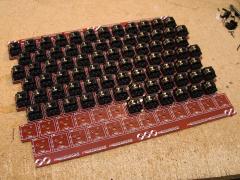 Wilba: we want to see a video made by yourself once it's finished! :)
 -
Wrong - you read the MBSID V1 FAQ, and you are mixing MBSID V1 features that have been developed 6 years ago with MBSID V2 features that are the current state. Meanwhile I spent a lot of sparetime to improve *a lot of* things. However, you are free to read the MBSID V2 manual on my webpage and to write a new Wiki page based on what you learnt, because it seems that nobody felt triggered to do this so far (probably because most people are aware about the V2 users manual) [text macro]Thats poor community effort btw. - if you don't like this, go away and search for another project! If you see the problem and want to help, feel welcomed to improve the wiki![text macro] Best Regards, Thorsten.
-
No, as Seppoman already mentioned, you can control each voice separately in Multi and Drum mode. Did you already read the user manual where such details are described? interesting pages that answer your questions: -> http://www.ucapps.de/midibox_sid_manual_hw.html -> http://www.ucapps.de/midibox_sid_manual_m.html -> http://www.ucapps.de/midibox_sid_manual_d.html E.g. with the multi engine you could assign each instrument to a different voice. Best Regards, Thorsten.
-
Can you confirm that one LCD works at J15A and J15B, and that it outputs different screens? (left/right side of the MBSEQ screen) In this case the hardware (core) is working correctly, and the application is properly installed as well. Initialisation is done here: http://svnmios.midibox.org/filedetails.php?repname=svn.mios32&path=%2Ftrunk%2Fmodules%2Fapp_lcd%2Fclcd%2Fapp_lcd.c Only the MBSEQ application will initialize mios32_lcd_device == 1 (all others only mios32_lcd_device == 0). As you can see in the source code, each device has a dedicated timeout flag - if MIOS32 doesn't get a response from a display after 2500 (!) tries, it won't be accessed anymore. The same mechanism have been used by the PIC based MBSEQ V2 and V3 firmwares since years, this is well tested code. Best Regards, Thorsten.
-
Thanks for the input! :) I just came back home and won't have the time today to check firmware changes by myself. However, I think that I know from where the delay is coming from: MIDI clock start was sent directly after the MIDI clock event, but it should be sent before. Could you please try following temporary release if it works at your side? If it still doesn't work, I will test this with various sequencers at my side... later. Track transpose page now always starts with semitone selection. Due to conceptional reasons it isn't possible to store the last setting, nor to make it configurable in a config file. The issues reported by Gridracer are not fixed yet. -> http://www.ucapps.de/mios32/midibox_seq_v4_0beta23_pre1.zip There are some preparations for OSC which hopefully won't conflict with existing functions. They are currently only working on an iPad, MBHP_ETH support will be added this weekend. Best Regards, Thorsten.
-
Lexicon Lambda?? Anybody use it to load sysex to MB?
TK. replied to JRock's topic in Testing/Troubleshooting
For the case that an incomplete app upload prevents further uploads (e.g. since the application crashes during runtime): could you please try to upload the application via 1st level bootloader? Just start the upload within 3 seconds after power-on. Best Regards, Thorsten. -
f0 00 00 7e 46 it seems that you've uploaded the wrong firmware - this is the SysEx header of MBSID V1 which is not compatible to a PIC18F4685 The link to the latest MBSID V2 firmware is published here: It's important that a V2 firmware is flashed into all PICs, otherwise the CAN bus won't work. This combination could even cause a short on the CAN bus - this could be an explanation for the high temperature on the second PIC. Best Regards, Thorsten.
-
The next giant matrix controller with a lot of X :thumbsup: Created by Ander aka. ALEXander aka. Wackazong
-
Great that you got it working! :) SID Player: the problem is that it has to run a C64 emulation for playback, because a .sid file contains the original sound player routine that has to be processed by a virtual 6510. For compatibility reasons, this would require at least 64k RAM + the RAM for MIOS32, the SD Card routines, etc. So, no chance to do this with a STM32 so long you don't use an external RAM as storage. A better solution is to use a tool like "siddump" to write SID register values and delays between write accesses into a file. Your MIOS32 app could read this file from SD Card and process it. Some time ago I wrote a small perl converter script to process the siddump output, you could use it as a basis for your own converter. The script is available here: http://www.ucapps.de/howto_sid_wavetables_1.html Best Regards, Thorsten. P.S.: I gave you access to the programmer's lounge.
-
Welcome back, Doug! :) Best Regards, Thorsten.
-
Today I sent the first OSC based MIDI messages from my iPad :) Macintosh:osc_midi_proxy TK$ ./osc_midi_proxy 192.168.1.108 10000 10001 Connecting to 192.168.1.108 on port 10000 Receiving on port 10001 in stat: : No such file or directory in stat: : No such file or directory [ 0] CoreMIDI, IAC Driver IAC-Bus 1 (default input) [ 1] CoreMIDI, IAC Driver IAC-Bus 2 (input) [ 2] CoreMIDI, Ploytec GM5 www.midibox.org Anschluss 1 (input) [ 3] CoreMIDI, Ploytec GM5 www.midibox.org Anschluss 2 (input) [ 4] CoreMIDI, Ploytec GM5 www.midibox.org Anschluss 3 (input) [ 5] CoreMIDI, Ploytec GM5 www.midibox.org Anschluss 4 (input) [ 6] CoreMIDI, Ploytec GM5 www.midibox.org Anschluss 5 (input) [ 7] CoreMIDI, Ploytec USB MIDI Junction II Anschluss 1 (input) [ 8] CoreMIDI, Ploytec USB MIDI Junction II Anschluss 2 (input) [ 9] CoreMIDI, Ploytec USB MIDI Junction II Anschluss 3 (input) [10] CoreMIDI, Ploytec USB MIDI Junction II Anschluss 4 (input) [11] CoreMIDI, Ploytec USB MIDI Junction II Anschluss 5 (input) Type input number: 0 [12] CoreMIDI: IAC Driver IAC-Bus 1 (default output) [13] CoreMIDI: IAC Driver IAC-Bus 2 (output) [14] CoreMIDI: Ploytec GM5 www.midibox.org Anschluss 1 (output) [15] CoreMIDI: Ploytec GM5 www.midibox.org Anschluss 2 (output) [16] CoreMIDI: Ploytec GM5 www.midibox.org Anschluss 3 (output) [17] CoreMIDI: Ploytec GM5 www.midibox.org Anschluss 4 (output) [18] CoreMIDI: Ploytec GM5 www.midibox.org Anschluss 5 (output) [19] CoreMIDI: Ploytec USB MIDI Junction II Anschluss 1 (output) [20] CoreMIDI: Ploytec USB MIDI Junction II Anschluss 2 (output) [21] CoreMIDI: Ploytec USB MIDI Junction II Anschluss 3 (output) [22] CoreMIDI: Ploytec USB MIDI Junction II Anschluss 4 (output) [23] CoreMIDI: Ploytec USB MIDI Junction II Anschluss 5 (output) Type output number: 13 HINT: next time you could select the MIDI In/Out port from command line with: ./osc_midi_proxy 192.168.1.108 10000 10001 --in 0 --out 13 MIDI IN 'CoreMIDI: IAC Driver IAC-Bus 1' opened. MIDI OUT 'CoreMIDI: IAC Driver IAC-Bus 2' opened. Proxy is running! ### Received 16 bytes [/midi1] timetag 0.1 (1 args), Method Arg: 0x00000000 [/midi1] 0: 643C9009 (MIDI) [MIDI_OUT] 90 3C 64 ### Received 16 bytes [/midi1] timetag 0.1 (1 args), Method Arg: 0x00000000 [/midi1] 0: 003C9009 (MIDI) [MIDI_OUT] 90 3C 00 ### Received 16 bytes [/midi1] timetag 0.1 (1 args), Method Arg: 0x00000000 [/midi1] 0: 643C9009 (MIDI) [MIDI_OUT] 90 3C 64 ### Received 16 bytes [/midi1] timetag 0.1 (1 args), Method Arg: 0x00000000 [/midi1] 0: 003C9009 (MIDI) [MIDI_OUT] 90 3C 00 ### Received 16 bytes [/midi1] timetag 0.1 (1 args), Method Arg: 0x00000000 [/midi1] 0: 643C9009 (MIDI) [MIDI_OUT] 90 3C 64 ### Received 16 bytes [/midi1] timetag 0.1 (1 args), Method Arg: 0x00000000 [/midi1] 0: 003C9009 (MIDI) [MIDI_OUT] 90 3C 00 ### Received 16 bytes [/midi1] timetag 0.1 (1 args), Method Arg: 0x00000000 [/midi1] 0: 643C9009 (MIDI) [MIDI_OUT] 90 3C 64 ... [/code] If you want to try this out: - update the repository - adapt the hard-coded IP address in Classes/OscServer_Wrapper.m (IP address of the host, will be configurable later) - compile and upload the application to your iPad - compile the OSC<->MIDI proxy under tools/osc_midi_proxy with "make -f Makefile.osx" - start it with "./osc_midi_proxy <ip-address-of-your-ipad> 10001" on your Mac and route OSC packets to a MIDI bus (or external MIDI interface) I haven't checked the performance (latency/jitter) yet, but will continue with this next week (after holidays...) Best Regards, Thorsten.
-
The virtual MIDIbox BLM16x16+X runs on a Windows PC or Mac and allows you to evaluate the new possibilities before building the hardware: Download and additional informations: http://www.ucapps.de/midibox_seq_manual_blm.html The thank-you goes to Phil Taylor, who ported the original Cocoa based solution to Juce, so that it can not only run on a Mac, but also under under Windows (and Linux if really required) Best Regards, Thorsten.
-
Duplicating LCD connections isn't possible, not at least because of the increased cable impedance (I tried this some time ago and noticed very bad results) I don't plan to add LCD output support to MBBLM because this would slow down the performance too much. Currently the performance is great, I don't want to make it bad by adding such minor features. Best Regards, Thorsten.
-
I will check this soon! Best Regards, Thorsten.
-
How to port mios32 to other microcontroller?
TK. replied to Arkadiuz's topic in MIOS programming (C)
Thanks for the input! I changed the files in the repository Best Regards, Thorsten. -
Hallo, Du bist der erste der danach fragt! ;) Fuer die baldige MIOS Studio 2.1 release koennte ich auch ein Linux binary bauen. Falls Du selber kompilieren moechtest, tippe mal "svn co svn://svnmios.midibox.org/mios32", gehe nach mios32/trunk/tools/mios_studio/build/linux", tippe "premake --file premake.lua --cc gcc --target gnu", anschliessend "make" (das MiosStudio.make file ist nicht mehr aktuell, deshalb muss via "premake" ein neues erstellt werden) Juce (v1.51) sollte sich im gleichen Pfad wie das heruntergeladene SVN Repository befinden, da auf die Juce Release mit indirekten Pfaden referenziert wird. Gruss, Thorsten.
-
E3 means that the SD Card wasn't mounted correctly. I've currently no explanation why this error could only occur while creating a new session, and why other file operations are still working. :-/ Do you have an alternative SD Card to try out if sessions can be created there? The reason for this "incompatible" behaviour is, that trigger layer assignments now also take effect on drum tracks. As you can read in the history of this thread, people were confused that this didn't happen before - I already feared that the result could be new confusion. ;) However, there is a simple solution: press MENU+TRIGGERS and assign "Gate" to trigger layer A, assign "Accent" to trigger layer B (if available), and disable the layers ("-") for all other trigger functions. Would it be sufficient to keep the last setting regardless of the track selection? Because I fear new error reports such as "strange behaviour of Octave/Semitone selection when switching between tracks". There is no other page that would behave this way So, you mean a possibility to play notes directly with GP buttons like in the BLM16x16+X video, with optional "force-to-scale", but w/o velocity? How to enter this mode - special button combination (which one?) or with a dedicated button? Best Regards, Thorsten.
-
http://svnmios.midibox.org/listing.php?repname=svn.mios32&path=%2Ftrunk%2Fetc%2Finf%2F This .inf file is already on your harddisk (-> SVN repository) Best Regards, Thorsten.
-
Alright, a new release is available now: MIDIboxSEQ V4.0beta22 ~~~~~~~~~~~~~~~~~~~~~ o running status optimisation can now be optionally disabled in the MBSEQ_HW.V4 file for MIDI devices that don't fully comply to the MIDI specification. Search for "RS_OPTIMISATION" in the MBSEQ_HW.V4 templates for further informations. o chaselight issue for mono colour 4x16 BLM fixed o trigger assignment page now works as intended in drum mode o new MIDI Bus parameters now loaded correctly after session change o another fix for crash if preset name is longer than 7 characters [/code] grizz: I need to know the error number if this happens Hint for Windows7 users: currently we (Phil and me) are very sure that the Windows7 USB driver provided by Microsoft cannot handle SysEx messages correctly in MIOS Studio if MIOS32 is configured for more than one USB MIDI port, because we have a counter example where SysEx transfers are perfectly working under Win7 with an alternative USB MIDI Driver. But I found a workaround that helps to get SysEx running again: open MIOS Studio, select the MIDI I/O ports of your MBSEQ V4 and type "help" into the MIOS Terminal multiple times until the complete help page is displayed: This allows you to upload a new firmware via USB w/o manually selecting bootloader mode. Btw.: virtual BLM16x16+X under windows anyone? :) Best Regards, Thorsten.
-
yes ok... I added the set/get functions, please update your SVN repository. -> http://www.midibox.org/mios32/manual/group___m_i_o_s32___u_a_r_t.html#g27e0f0a4efaf73173c9225e3e28d559a Best Regards, Thorsten.
-
Hi, Here: http://svnmios.midibox.org/filedetails.php?repname=svn.mios32&path=%2Ftrunk%2Fdoc%2Fmios32%2FMIOS32_CONFIG.txt The USB COM protocol only supports a single IO connection. Are you working under Windows? In this case you won't be able to run USB MIDI and USB COM in parallel anyhow (e.g. WinXP will crash!) - this would only work under MacOS Is this a hypothetical question, or do you really need this function? Then I could add MIOS32_COM_BaudrateSet() for you... Best Regards, Thorsten.